For most of the last two years, AI search performance has been a black box. You could see AI Overviews growing, watch your click-through rates slide, and sense that something fundamental had changed about how Google surfaced your content, but you had no first-party data to explain what was actually happening. That changed on June 3, 2026, when Google began rolling out dedicated Generative AI performance reports inside Search Console.
This guide walks you through exactly how to find that data, what it can and can’t tell you, and how to build it into a monitoring routine you’ll actually stick to.
What Is AI Search Visibility And Why Google Search Console Now Tracks It
AI search visibility refers to how often and where your content appears in AI-generated results: AI Overviews, AI Mode, and the generative AI features now appearing in Discover. Until recently, any impressions your pages earned inside these features were folded silently into Search Console’s standard Performance report, blended together with traditional blue-link organic data. There was no way to isolate one from the other.
That made generative AI visibility almost impossible to measure with confidence. You could infer that AI Overviews were affecting your traffic, but you couldn’t prove it, page by page, with your own data. Google’s new reporting layer changes that by giving AI visibility its own dedicated view, separate from traditional organic performance.
What Changed: Google’s New Generative AI Performance Reports
Google’s Search Generative AI performance reports began rolling out to a subset of UK-based Search Console properties before expanding more broadly. The reports cover three of Google’s own AI surfaces: AI Overviews, AI Mode, and the generative AI features inside Discover. Alongside the new reports, Google also introduced an opt-out toggle that lets site owners exclude their content from AI features entirely, without affecting how that same content ranks in traditional organic search.
What the Report Includes
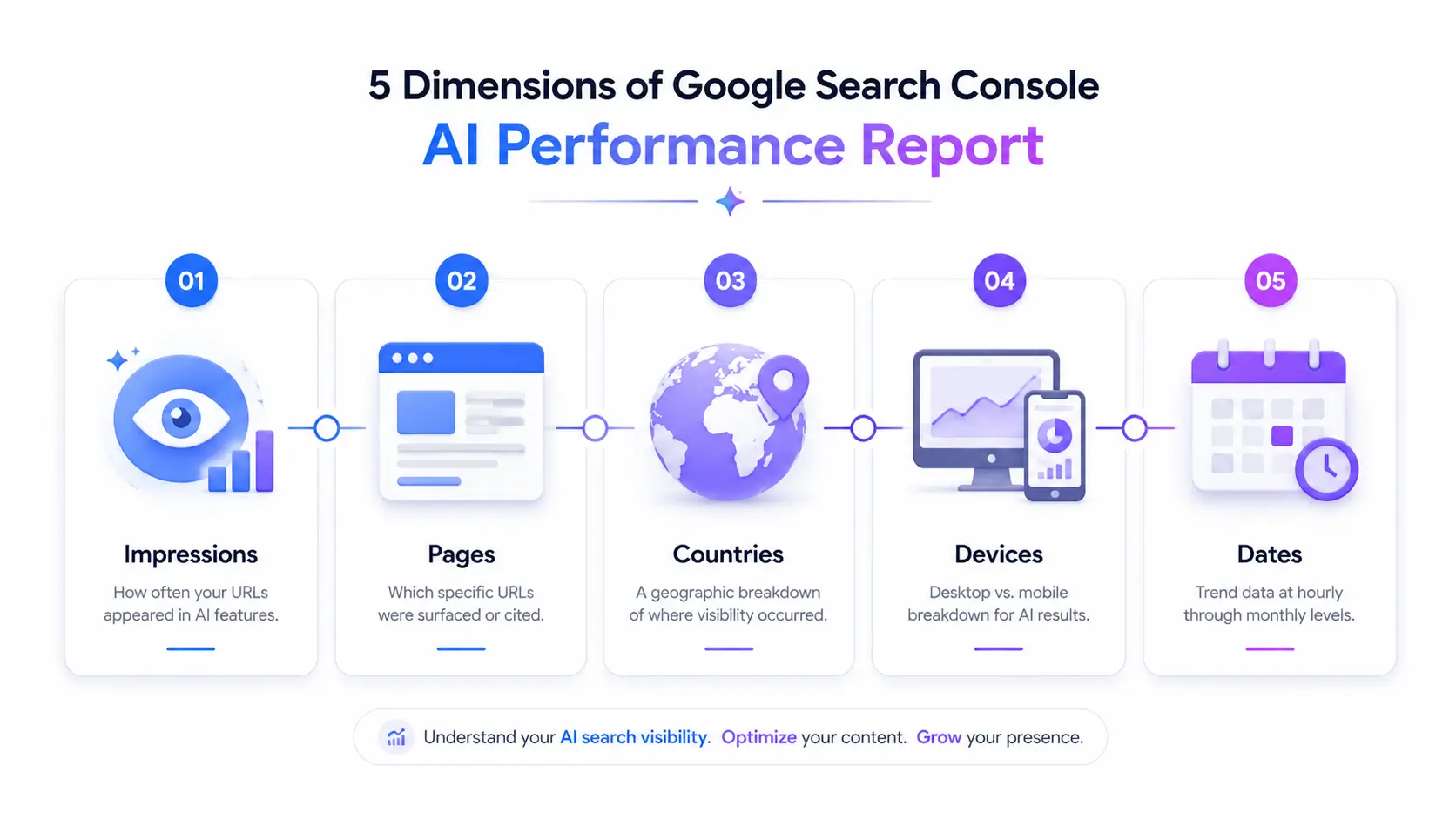
The AI report is built around five dimensions:
- Impressions: how often your URLs appeared inside AI features
- Pages: which specific URLs were surfaced or cited
- Countries: a geographic breakdown of where that visibility occurred
- Devices: desktop vs. mobile breakdown for AI Mode results
- Dates: trend data at hourly through monthly granularity
This is the first native window SEOs have had into how their content performs specifically inside generative AI features, rather than as part of a blended, unlabeled total.
What’s Still Missing
The report has real limitations, and it’s worth being upfront about them before you build a workflow around the data:
- No click data. You can see that a page was impressed inside an AI feature, but not whether that impression led to a click.
- No query-level detail. You won’t see which specific search queries triggered the AI feature that surfaced your page.
- No historical backfill. Data collection starts from May 18, 2026 there’s no way to look back further than that, even if your site was already appearing in AI Overviews before the report existed.
None of this makes the report less useful. It just means you should treat it as a visibility signal, not a full performance report.
Step-by-Step: How to Access AI Visibility Data in Search Console
Locating the AI Report in Your Property
Open the property you want to check, and look inside the left-hand navigation for the new AI-specific report, sitting alongside the standard Performance report rather than nested inside it. If you don’t see it yet, the rollout is still expanding globally check back in the coming weeks, since availability is expanding property by property rather than switching on for everyone simultaneously.
Filtering by Page, Country, and Device
Once you’re in the report, use the built-in filters to narrow the data to what actually matters for your analysis. Filtering by page lets you check whether specific high-value URLs cornerstone guides, product pages, comparison content are earning AI impressions. Filtering by country matters if you operate in multiple markets, since AI feature rollout and behavior can vary significantly by region. Device filtering is worth checking too, since AI Mode usage patterns often skew differently between mobile and desktop.
Setting a Date Range (Data Starts May 18, 2026)
Because there’s no historical backfill, don’t waste time trying to pull a “before and after” comparison against older periods the data simply isn’t there. Instead, set your date range starting from May 18, 2026, and treat everything before that as unmeasurable. Going forward, this becomes your true baseline.
Google Search Console Platform Properties
Google Search Console Platform Properties can give SEO professionals a broader understanding of how a website performs across Google Search. Instead of looking at individual URL variations separately, a platform-level view can help you analyze your website more holistically. This becomes especially useful for websites with multiple URL versions, subdomains, or different site configurations. As Google continues to expand AI-driven search features such as AI Overviews and AI Mode, understanding your website’s overall search visibility is becoming increasingly important. By combining platform-level insights with Search Console’s AI performance data, SEO professionals, digital marketers, and learners pursuing a digital marketing course in Thrissur can identify which areas of a website are gaining visibility, which pages need improvement, and how the overall search presence is evolving.
How to Read and Interpret the Data
Why Impressions Are Rising While Clicks Fall
If you’re seeing your AI impressions climb while your overall organic clicks decline, you’re not necessarily doing anything wrong. When an AI Overview or AI Mode result triggers, users frequently get their answer directly on the results page, which naturally reduces the click-through rate to your site even when your content was the source. This is one of the most important mental shifts in reading Search Console data in 2026: impressions and clicks are starting to tell two different stories, and you need both to understand what’s really happening.
Separating Branded vs. Non-Branded Visibility
Branded queries searches that already include your company or product name will almost always convert and perform better than non-branded queries, which makes them a poor gauge of genuine SEO opportunity. Use the query filter in the standard Performance report to exclude your brand terms, or use the built-in Branded/Non-Branded toggle if your property has it. Once you’re looking at non-branded visibility only, you get a much cleaner read on how well your content is genuinely competing for AI feature placement.
Avoiding Weekly Noise: Use Monthly Trends
Google frequently tests different AI Overview formats, lengths, and source-selection logic. A dip in citations over a single week may simply reflect one of these tests running, not a real decline in your visibility. Resist the urge to react to short-term swings. Pull your AI visibility data monthly, and only treat a trend as meaningful once it holds across several consecutive reporting periods.
Combining AI Reports With the Standard Performance Report
Cross-Referencing Pages That Appear in Both Reports
The AI report and the standard Performance report aren’t meant to be read in isolation the real insight comes from comparing them side by side. Export your top pages from both reports and look for overlap. Pages that show strong impressions in both are your most versatile content: they’re working across traditional and AI-driven search simultaneously.
Spotting Pages That Win Impressions But Lose Clicks
Pay particular attention to pages that show healthy AI impressions but a falling or flat click count in the standard report. This pattern often means your content is being pulled into AI summaries effectively enough to answer the user’s question on the results page itself, leaving them with less reason to click through. That’s not necessarily a failure it can indicate strong topical authority but it’s a signal worth watching if that page also needs to drive traffic or conversions.
What Google Search Console Still Can’t Show You
It’s worth being honest about the boundaries here. Search Console’s AI reports only cover Google’s own surfaces: AI Overviews, AI Mode, and Discover. They say nothing about how your content performs or whether it’s cited at all inside ChatGPT, Perplexity, Copilot, Gemini’s standalone app, or any other answer engine. If you need visibility across that broader landscape, you’ll need to supplement Search Console with dedicated third-party AI visibility monitoring tools, since first-party data for those platforms doesn’t exist inside Google’s ecosystem.
Turning AI Visibility Data Into Action
Signals That Suggest You Should Update a Page
A few patterns in the data are worth acting on:
- A page with strong traditional rankings but low or zero AI impressions may need clearer, more directly extractable answers near the top of the content.
- A page with rising AI impressions but declining clicks may benefit from a stronger, more specific value proposition that gives users a reason to click through rather than stopping at the summary.
- A page that’s improved in neither report after a content refresh may indicate the topic itself isn’t a strong candidate for AI feature inclusion right now.
Building a Simple Monthly AI Visibility Tracking Routine
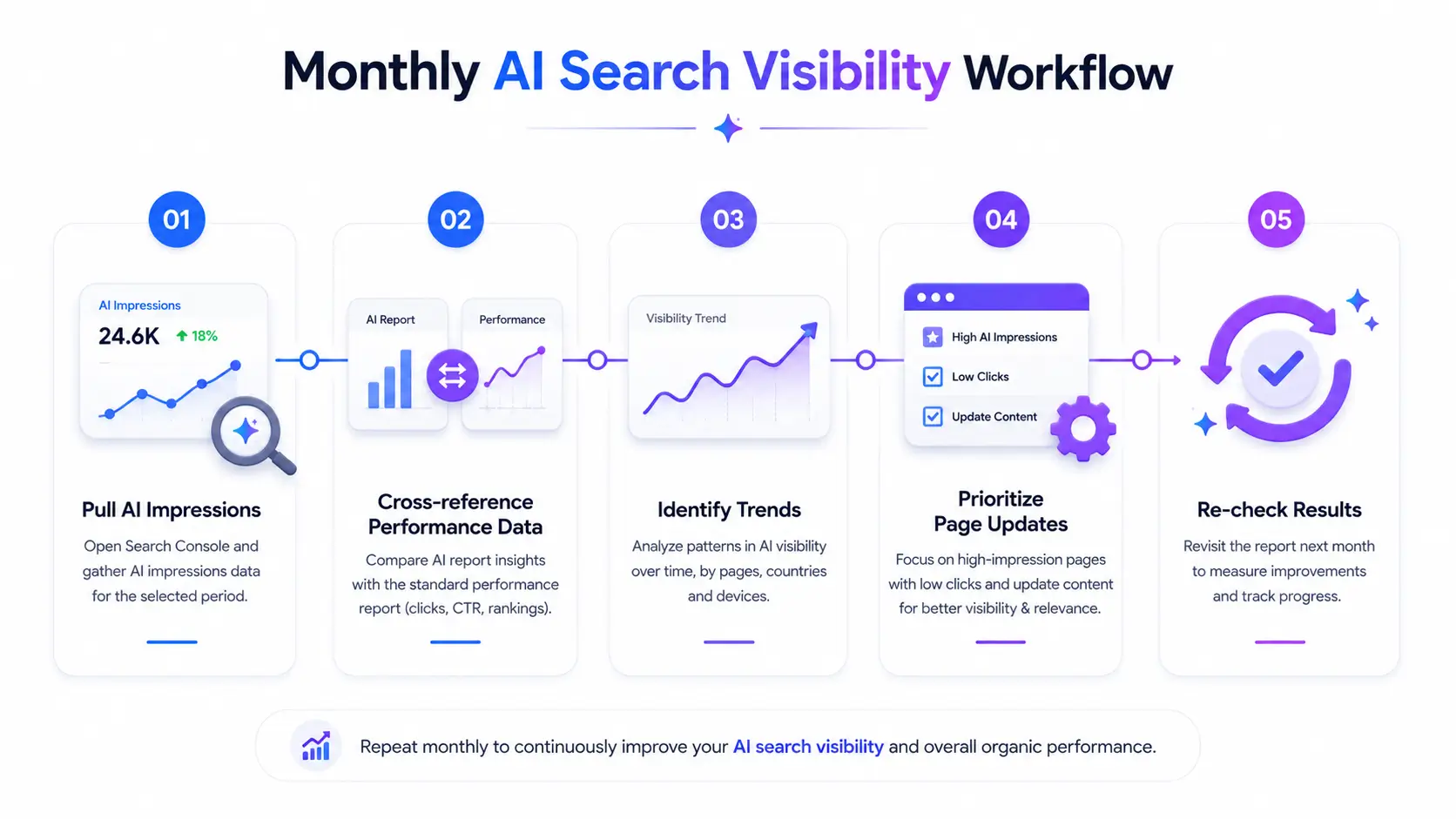
Treat this as a recurring habit, not a one-time check:
- Pull AI report impressions by page, filtered to non-branded queries where possible.
- Cross-reference against the standard Performance report for the same pages.
- Flag pages with notable movement up or down held across at least two consecutive months.
- Prioritize updates on pages with high impression volume but weak click performance.
- Re-check the following month to confirm whether changes moved the needle.
The key mindset shift is this: treat AI impressions as a top-of-funnel visibility metric, and clicks as your conversion metric. Neither number alone tells the full story but together, tracked consistently, they give you the clearest picture available right now of how your content is performing inside the AI-driven search landscape.
For context on how significant this shift has become: AI Overviews now appear on nearly half of all search queries, up from roughly a third just a year earlier, and when an AI Overview triggers, organic click-through rates can drop sharply while sites that do earn a citation inside those summaries see a meaningful lift in the organic clicks they still capture. That’s the gap this new reporting layer is finally letting you measure directly.
Frequently Asked Questions
Does Google Search Console track AI Overview traffic?
Yes. Since June 3, 2026, Search Console’s Generative AI performance reports show impressions from AI Overviews, AI Mode, and AI features in Discover. However, click data and search-query-level detail are not yet included, so you can see visibility but not full performance.
When did Google add AI reports to Search Console?
Google began rolling out dedicated Search Generative AI performance reports on June 3, 2026, starting with a subset of UK-based sites before expanding globally. Data collection starts from May 18, 2026, with no historical backfill before that date.
Why are my clicks falling while impressions are rising in Search Console?
This usually reflects AI Overviews and AI Mode surfacing your content in generative AI answers, which register as impressions but often don’t produce a click since users get their answer directly on the results page. Track both metrics together, not in isolation.
Can I stop my content from appearing in AI Overviews?
Yes. Google introduced an opt-out toggle alongside the new AI reports, letting site owners exclude their content from AI features without affecting how they rank in traditional organic search results.
Does the AI report show which specific pages get cited?
Partially. The report breaks impressions down by page, so you can see which URLs appear in AI features, but it doesn’t show the actual query that triggered the citation or whether that impression converted to a click.
Can Google Search Console track my visibility on ChatGPT or Perplexity?
No. Search Console only reports on Google’s own AI surfaces AI Overviews, AI Mode, and Discover. Tracking visibility across other answer engines like ChatGPT, Perplexity, or Copilot requires separate third-party monitoring tools.


