Introduction: Why Digital Marketers Should Learn Claude Skills
Digital marketing runs on repetition. Every week brings another round of keyword research, content briefs, on-page SEO checks, social captions, and performance reports. The details change, but the pattern rarely does, and retyping the same instructions to an AI assistant each time is its own kind of busywork.
That is where Claude Skills for Digital Marketing come in. A Skill packages your instructions, templates, and quality checks so Claude can follow the same workflow every time. The payoff is less manual effort, more consistent output, and more time for the strategy and analysis that actually move campaigns forward. This guide covers what Skills are, how to build one, five worth creating, and the mistakes to avoid.
What Are Claude Skills?

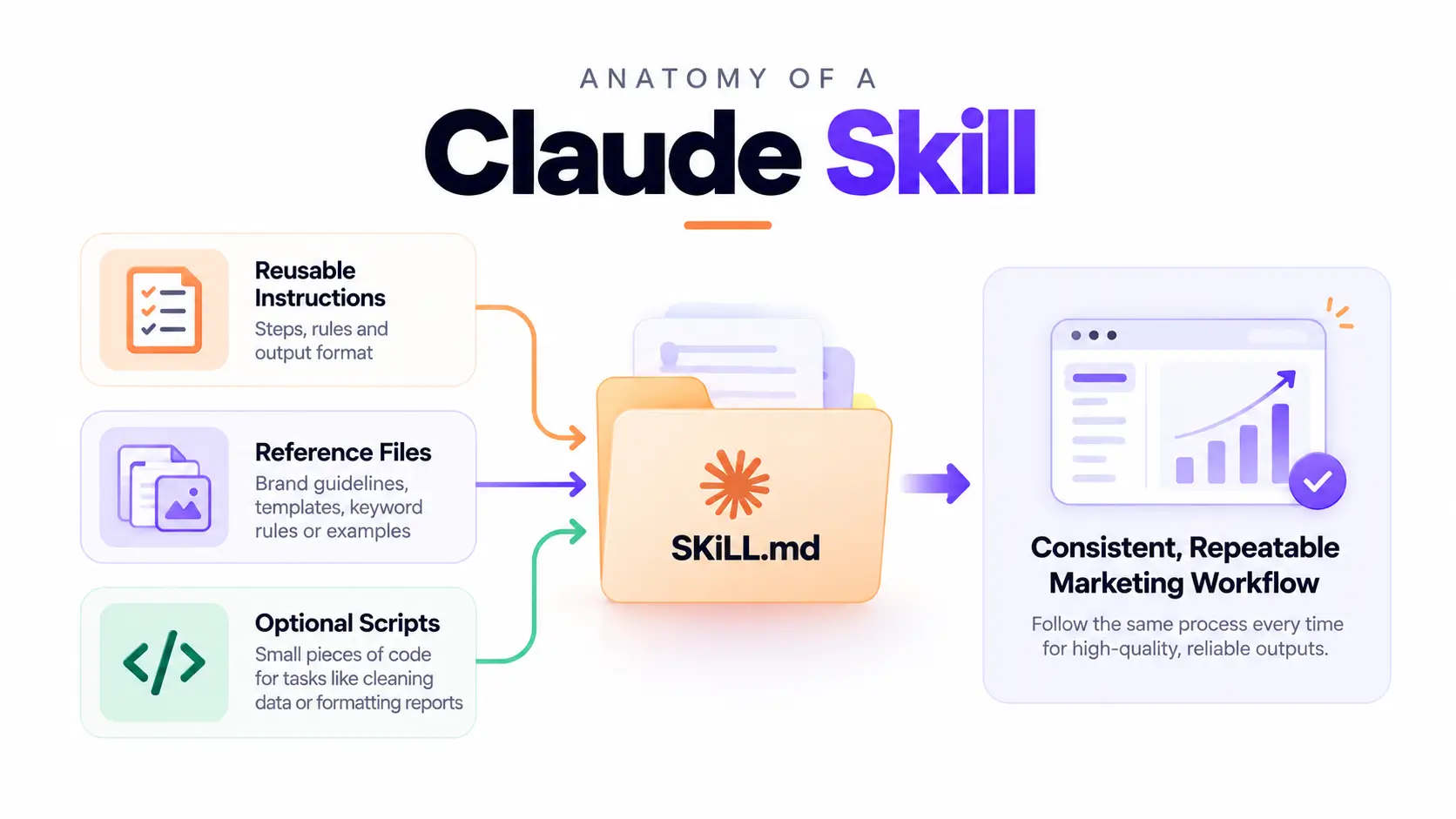
Claude Skills are reusable packages that teach Claude how to handle a specific kind of task. At their simplest, a Skill is a folder containing a main instruction file (usually called SKILL.md) that describes what the Skill does and how Claude should carry it out. Claude reads a short description of each available Skill and loads the full instructions only when a task calls for them.
Most Skills include three ingredients:
- Reusable instructions: the steps, rules, and output format for the workflow.
- Reference files: brand guidelines, templates, keyword rules, or examples of strong work.
- Scripts (optional): small pieces of code for tasks such as cleaning a CSV or formatting a report.
So how is this different from a normal prompt? A prompt is a one-time instruction for a single request. A Skill is a standing playbook that Claude can reuse across many conversations, which makes recurring tasks far more consistent. Ten team members using the same Skill will get outputs that follow the same structure and standards.
One important caveat: Skills guide Claude through repeatable workflows. They do not automatically connect to your marketing platforms or run tasks independently in the background.
Why Use Claude for Digital Marketing Automation?
Marketing teams rarely lack ideas. They lack hours. Using Claude with well-built Skills helps in several practical ways:
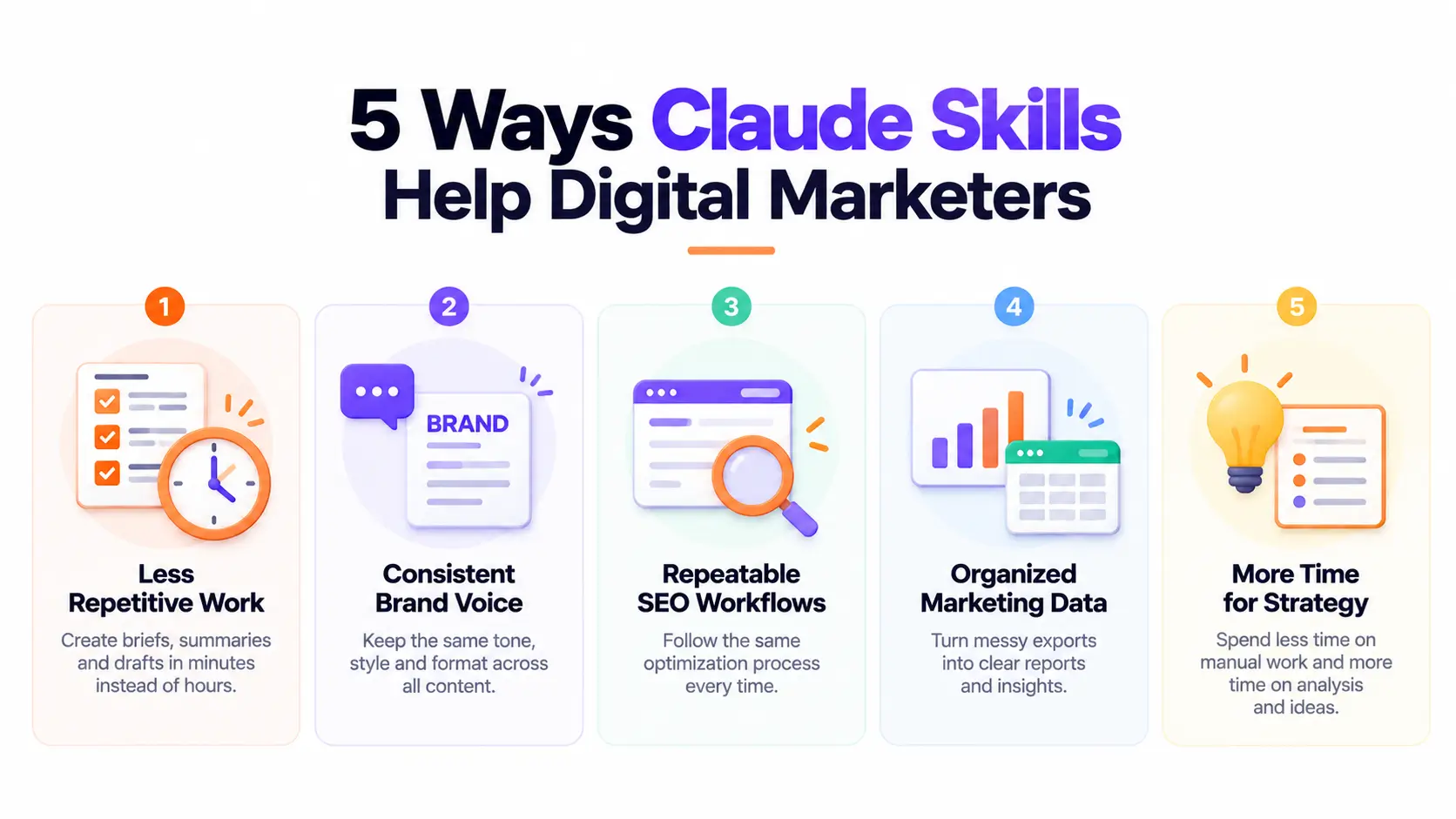
- Less repetitive manual work. Briefs, summaries, and first drafts take minutes instead of an hour.
- Consistent brand voice and formats. Every output follows the same tone, structure, and style rules.
- Repeatable SEO and content workflows. Checks happen the same way every time, not only when someone remembers them.
- Organized data and structured reports. Messy exports become clear tables and summaries.
- More time for strategy. Your attention shifts from formatting and assembly to analysis and decisions.
Consider a simple comparison. Without a Skill, you paste a paragraph of instructions into every new chat: “Write an SEO brief, use our tone, include these sections, suggest internal links, keep metadata under these limits.” You forget a detail, and the output drifts. With a custom Skill, you simply say, “Create a brief for this keyword,” and Claude applies the full standard automatically.
How to Build Claude Skills Step by Step
Building a Skill is less technical than it sounds. If you can document a process for a new colleague, you can build a Skill. Follow these six steps.
Step 1: Identify a repetitive marketing task
Start with one task you do often and that follows a predictable pattern, such as creating SEO briefs, summarizing monthly campaign performance, or repurposing blog posts for social media. A narrow task produces a better Skill than a vague, all-purpose one. A good test: if you have explained the process to someone more than twice, it is a candidate.
Step 2: Define the workflow and expected output
Write down what goes in, what happens, and what comes out. Specify the inputs (target keyword, audience, data exports), the steps Claude should follow, the formatting rules, the quality checks, and the final deliverable. For example: “Input: keyword and competitor URLs. Output: a one-page brief with outline, metadata, and internal links.” The clearer this definition, the more reliable the Skill.
Step 3: Create your Skill with Claude
You do not have to write the Skill files by hand. Describe your workflow to Claude in plain language and ask it to create a Skill package from it. Claude can draft the instruction file, suggest a name and description, and structure the folder. Treat this as a first draft, because you will refine it in the next steps.
Step 4: Add instructions and reference materials
This step separates generic Skills from useful ones. Add your brand guidelines, approved templates, keyword and naming rules, and a few examples of good output. Examples are especially powerful because they show Claude what “good” looks like in your context. Keep reference files focused and current so Claude is not working from outdated material.
Step 5: Test and refine the Skill
Run the Skill on realistic tasks, not ideal ones. Use a real keyword, a real data export, a messy brief. Note where the output misses the mark: wrong tone, missing sections, invented details. Then update the instructions to fix those errors and test again. Two or three rounds usually produce a dependable result.
Step 6: Enable and reuse the Skill
Once you are happy with it, upload and enable the Skill so Claude can use it in your conversations. Keep in mind that availability and setup requirements depend on your Claude environment and account type, so check the current documentation for the exact steps. After it is enabled, reuse it whenever the task comes up, and share it with teammates where your plan allows.
5 Claude Skills Every Digital Marketer Can Build
Here are five practical Skills to consider, from content creation to reporting.
1. SEO Content Optimization Skill
This Skill creates content briefs, maps keywords to search intent, suggests headings, and checks on-page SEO requirements such as title length, meta descriptions, and heading structure. It ensures every article starts from the same strategic foundation instead of a blank page.
2. Blog Writing Skill
Pair your brand voice with an editorial checklist. The Skill generates structured drafts that follow your tone, internal linking guidelines, formatting preferences, and editorial requirements. Writers and editors then spend their time improving ideas rather than correcting basic style issues.
3. Social Media Content Skill
Turn one blog post into many assets. This Skill repurposes long-form content into Instagram captions, LinkedIn posts, and a simple content calendar, adapting length and tone for each platform while keeping your messaging consistent across channels.
4. Competitor and Keyword Analysis Skill
Give this Skill the keyword and competitor data you have collected, and it organizes everything into topic clusters, content gaps, and priority recommendations. It works best as an analysis layer on top of exports from your research tools, not as a source of search data itself.
5. Marketing Reporting Skill
Upload GA4, Google Search Console, or campaign exports, and this Skill summarizes trends, highlights insights, and proposes next steps in a fixed report format. Stakeholders get consistent monthly reports, and you spend less time building them from scratch.
Example : Build an SEO Content Skill for Your Workflow
Let’s walk through one example. The problem: every blog post requires a fresh brief and optimization pass, and the quality varies depending on who does it and how rushed they are.
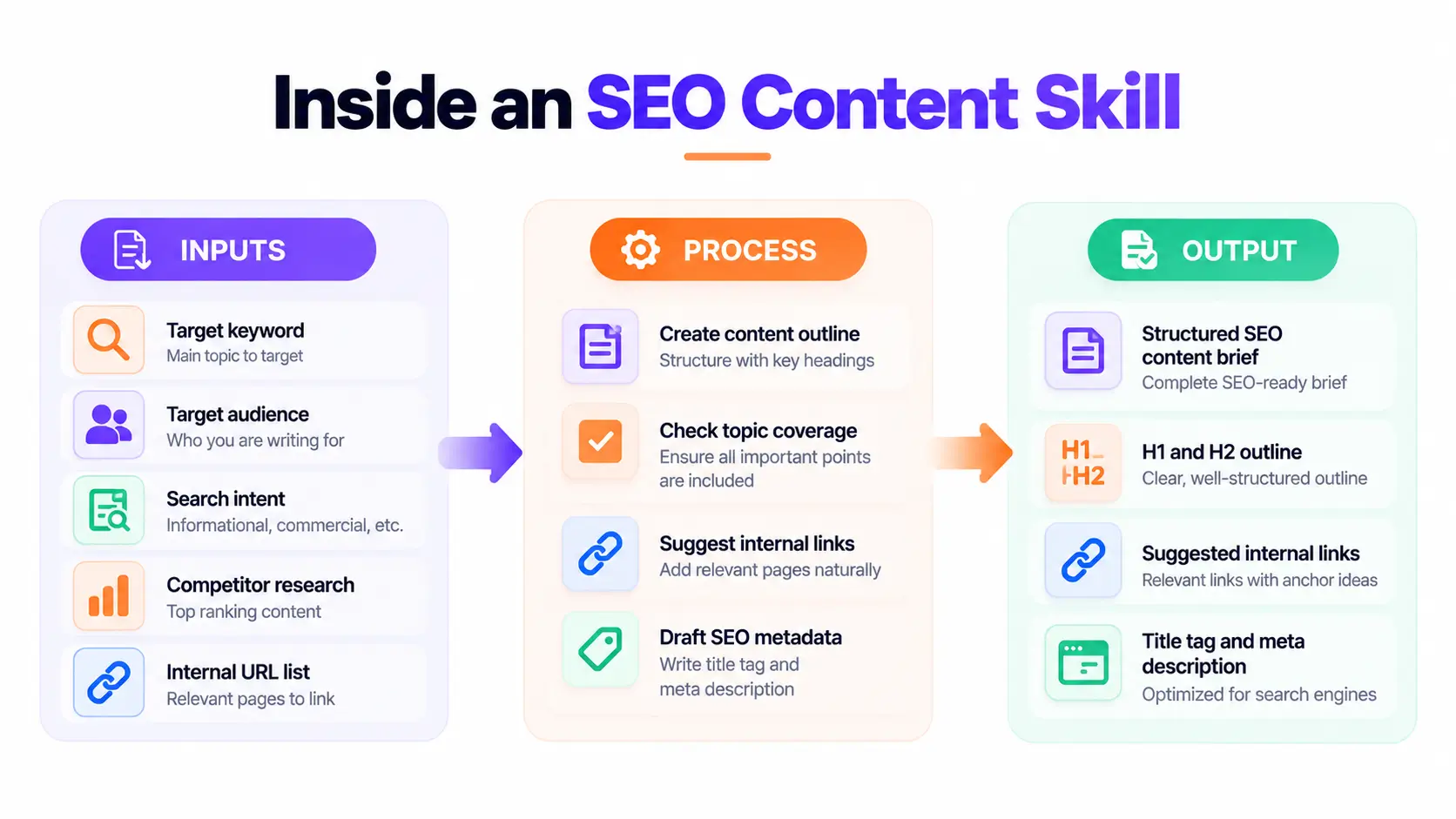
The inputs: target keyword, audience, search intent, competitor research, and a list of internal URLs.
The workflow: Claude creates an outline, checks topic coverage against the competitor research you supplied, recommends relevant internal links, and drafts a title tag and meta description.
The output: a standardized SEO content brief (or a first draft) in the same format every time.
Here is a sample instruction you can adapt for your SKILL.md file:
When the user provides a target keyword, audience, and search intent, create an SEO content brief. Include: a proposed H1, an outline with H2 and H3 headings, topics to cover based on the supplied competitor research, three to five internal link suggestions from the provided URL list, and a title tag (under 60 characters) and meta description (under 160 characters). Use only keyword data and competitor information supplied by the user. If data is missing, say so and ask for it. Never invent search volumes, rankings, or statistics.
That last rule matters. Keyword metrics and competitor information should come from reliable research or supplied data. A Skill that makes up numbers will produce confident-looking briefs built on nothing, so build that guardrail into every analytical Skill you create.
Claude Skills vs Prompts vs Marketing Automation Tools
These three concepts often get blurred together, but they solve different problems.
- Prompts are instructions for a particular request. They are quick and flexible, but you must restate them each time.
- Claude Skills are reusable instructions and resources for specialized workflows. They bring consistency and save setup time on recurring tasks.
- Automation tools are software platforms that connect apps, trigger actions, and move data between systems, such as publishing a post when a draft is approved or sending a weekly report on a schedule.
The key distinction is this: a Skill alone does not guarantee automatic publishing, live analytics access, or scheduled execution. Those capabilities may require integrations, APIs, permissions, or an external automation platform. In practice, the strongest setups combine them: Skills define how the work should be done, while automation tools handle when and where it happens.
Connecting Meta Ads MCP to Claude AI
Connecting Meta Ads MCP to Claude AI can extend your marketing workflow beyond content creation. With the appropriate integration and permissions, Claude can access supported Meta Ads data, analyze campaign performance, identify trends, and assist with campaign management. This helps digital marketers streamline reporting and make data-informed decisions.
Best Practices and Common Mistakes to Avoid
A few habits will keep your Skills useful and safe:
- Start with one well-defined task. Skills that try to do everything usually do nothing well.
- Write specific instructions and include examples. Vague guidance produces vague output.
- Use current, reliable source data. Outdated keyword lists and old brand guides quietly degrade results.
- Check outputs before publishing or launching campaigns. Review facts, links, and claims every time.
- Protect customer data and credentials. Never place passwords, API keys, or sensitive customer information in Skill files.
- Use trusted Skills and review any scripts. If a Skill includes executable code, read it before enabling it.
- Update instructions when workflows change. A Skill is a living document.
Above all, remember that AI-assisted automation still needs human oversight. Claude can speed up the work, but you remain accountable for accuracy, compliance, and brand reputation.
Conclusion — Start Building Your First Claude Skill
Claude Skills turn the repetitive parts of digital marketing into reliable, reusable workflows. They improve consistency, cut down on manual effort, and let you focus on the decisions that need human judgment.
Don’t try to automate everything at once. Pick a single workflow, build a simple Skill, test it on real tasks, and refine it. Over time, you can grow a library of marketing Skills that your whole team can rely on.
Ready to master AI-powered digital marketing? Enroll in a professional digital marketing course in Kochi and learn SEO, AI tools, and automation skills to advance your career. Start building smarter marketing workflows today!


