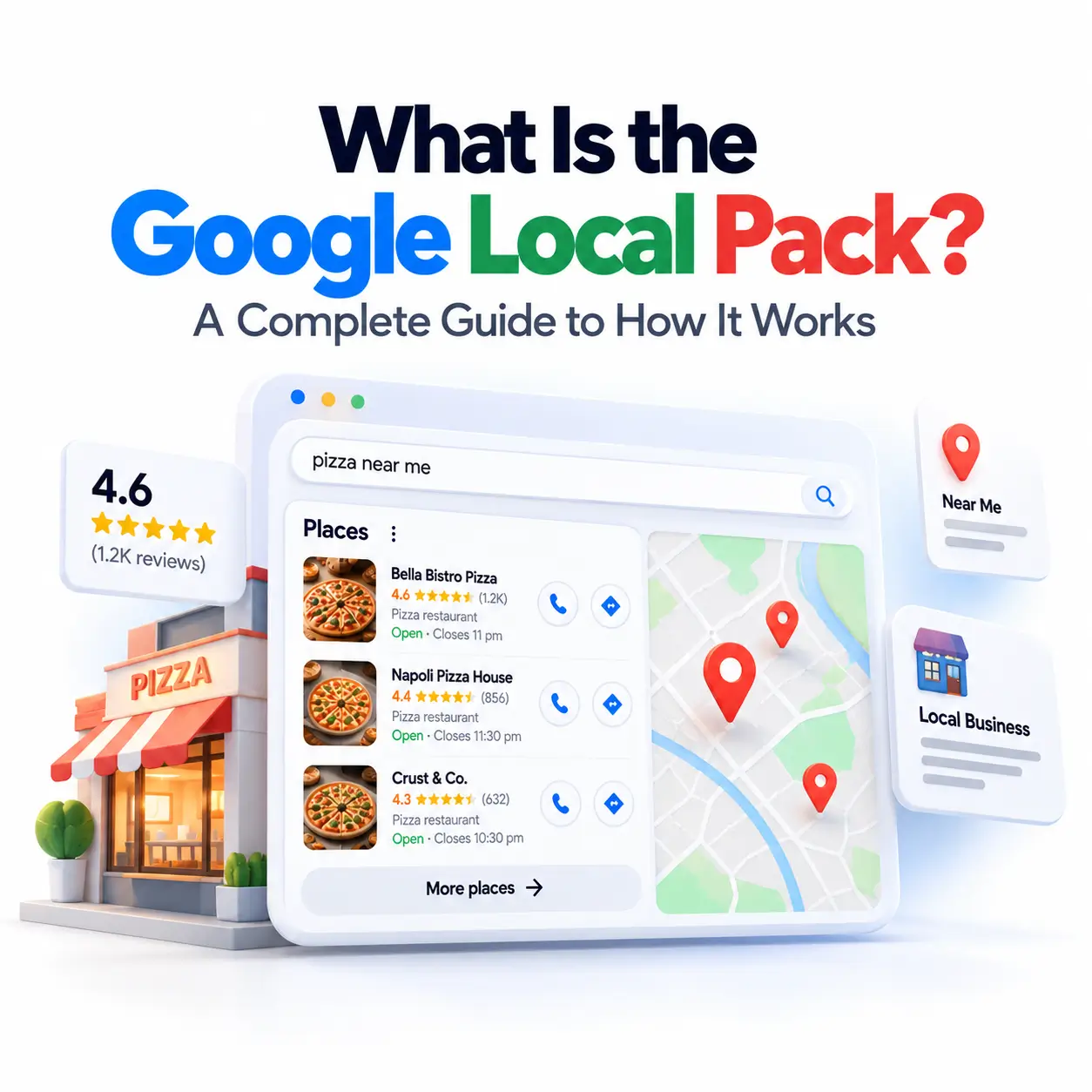
If you’ve ever searched for “pizza near me” or “plumber in [city]” and noticed a map with three business listings pop up right above the regular search results, you’ve already seen the Google local pack in action. It’s one of the most valuable pieces of real estate in local search and for many small businesses, it’s the single biggest driver of walk-in customers, phone calls, and bookings.
This guide breaks down exactly what the local pack is, how Google decides who gets featured in it, and what you can do to get your own business in front of nearby customers.
What Is the Google Local Pack?
The Google local pack also known as the local 3-pack, map pack, or “snack pack” is a search results feature that displays a map alongside three local business listings whenever Google detects a search with local intent. It typically appears at or near the top of the page, above standard organic listings.
Each listing in the pack pulls information directly from a business’s Google Business Profile, showing the business name, star rating, number of reviews, category, hours, and sometimes a phone number or “Directions” button. It’s designed to give searchers everything they need to make a quick decision without clicking through to a website.
The local pack shows up for queries with clear geographic or “near me” intent think “coffee shop near me,” “dentist in Austin,” or “24-hour locksmith.” Google doesn’t need the word “near me” to trigger it, either; it can infer local intent from the query itself (like “bakery”) combined with the searcher’s location.
What Does the Local Pack Look Like?
Visually, the local pack is hard to miss. It’s a boxed section with an embedded map and three business “cards” stacked beneath or beside it, each showing a name, rating, and short snippet of information.
Local Pack on Desktop vs. Mobile
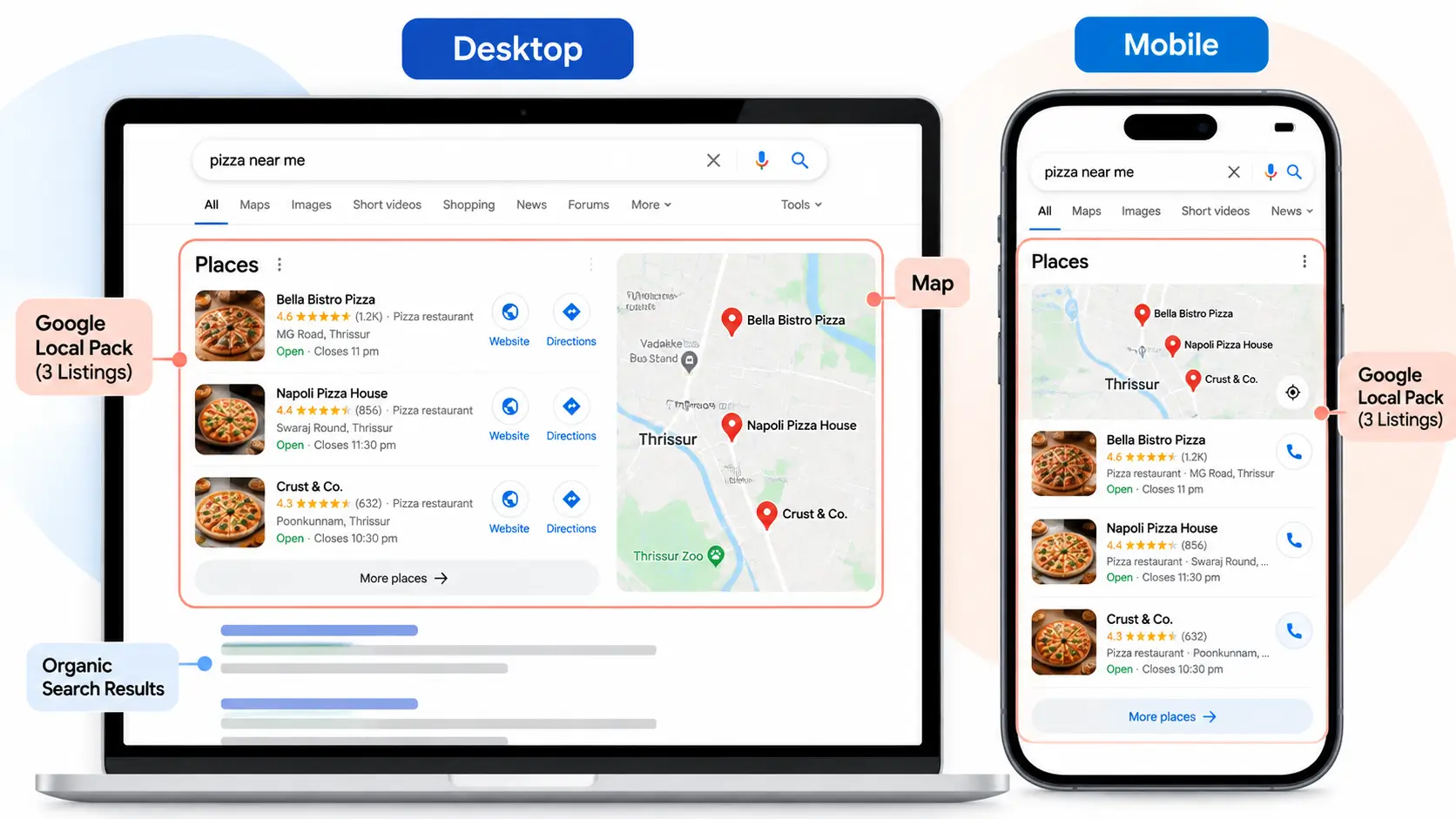
On desktop, the local pack usually appears with the map on the right and the three listings on the left, sitting above traditional blue-link organic results. On mobile, the map typically sits at the top with the three listings stacked vertically underneath taking up a significant portion of the screen, since most local searches happen on mobile devices in the first place.
Local Pack vs. Local Finder (“More Places”)
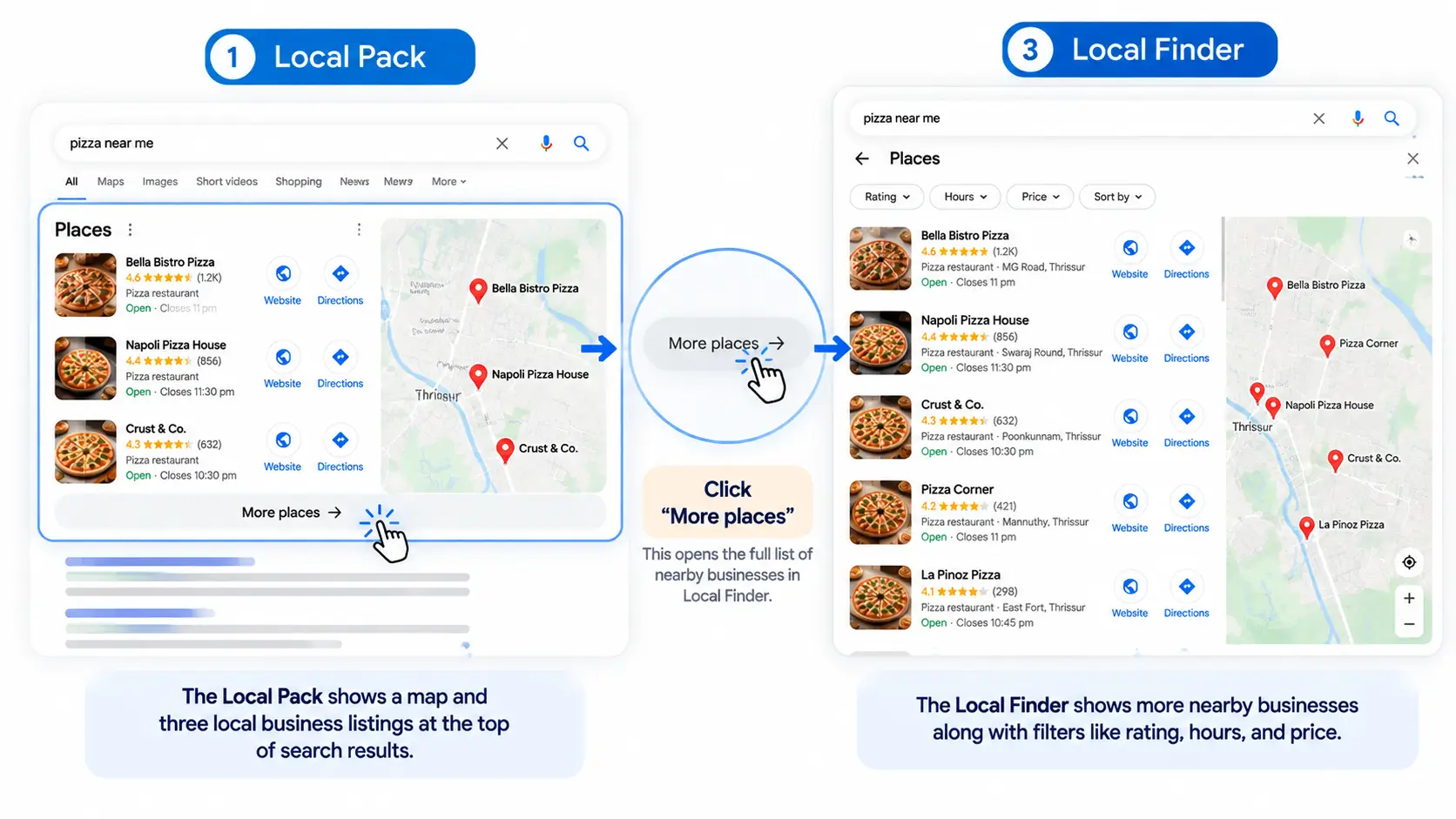
Below the three visible listings, there’s usually a “More places” link. Clicking it opens the Local Finder, an expanded view showing a longer list of nearby businesses along with filtering options (price, hours, rating, and more). Think of the local pack as the highlight reel and the Local Finder as the full lineup.
Why the Local Pack Matters for Businesses
The local pack isn’t just a nice visual it’s where the clicks go. According to BrightLocal’s 2026 research, roughly 44% of clicks on location-intent searches go to the local pack rather than the organic results below it. Businesses that land in the top three positions can see dramatically higher click-through rates than a typical organic listing further down the page, simply because of where the pack sits and how much attention it commands.
For a local business, that means the local pack often outperforms traditional SEO in terms of driving in-market, ready-to-act customers people looking for a business right now, not just researching a topic.
Local Pack vs. Organic Search Results
It’s easy to assume the local pack and organic rankings are the same thing, but they’re driven by different though related systems. Organic rankings are based primarily on your website’s content, backlinks, and technical SEO health. The local pack, by contrast, leans heavily on your Google Business Profile signals: reviews, categories, proximity, and business information consistency. A business can rank well organically but be absent from the local pack, or vice versa which is why local pack optimization is often treated as its own discipline within SEO, sometimes called Local SEO.
How the Google Local Pack Works
What Triggers the Local Pack to Appear?
Google shows the local pack when it interprets a query as having local intent. That can be explicit (“near me,” a city name) or implicit, based on the nature of the search itself. Searches for restaurants, service providers, medical practices, and retail stores are especially likely to trigger it, since these are the kinds of businesses people typically want to visit in person.
Does the Local Pack Use Organic Ranking Signals?
Partially. While the local pack draws mainly from Google Business Profile data, Google has confirmed that organic ranking signals like the authority and relevance of a business’s website do factor into local pack placement. In other words, a strong website and backlink profile can indirectly support your local pack visibility, even though it’s not the primary driver.
Google Local Pack Ranking Factors
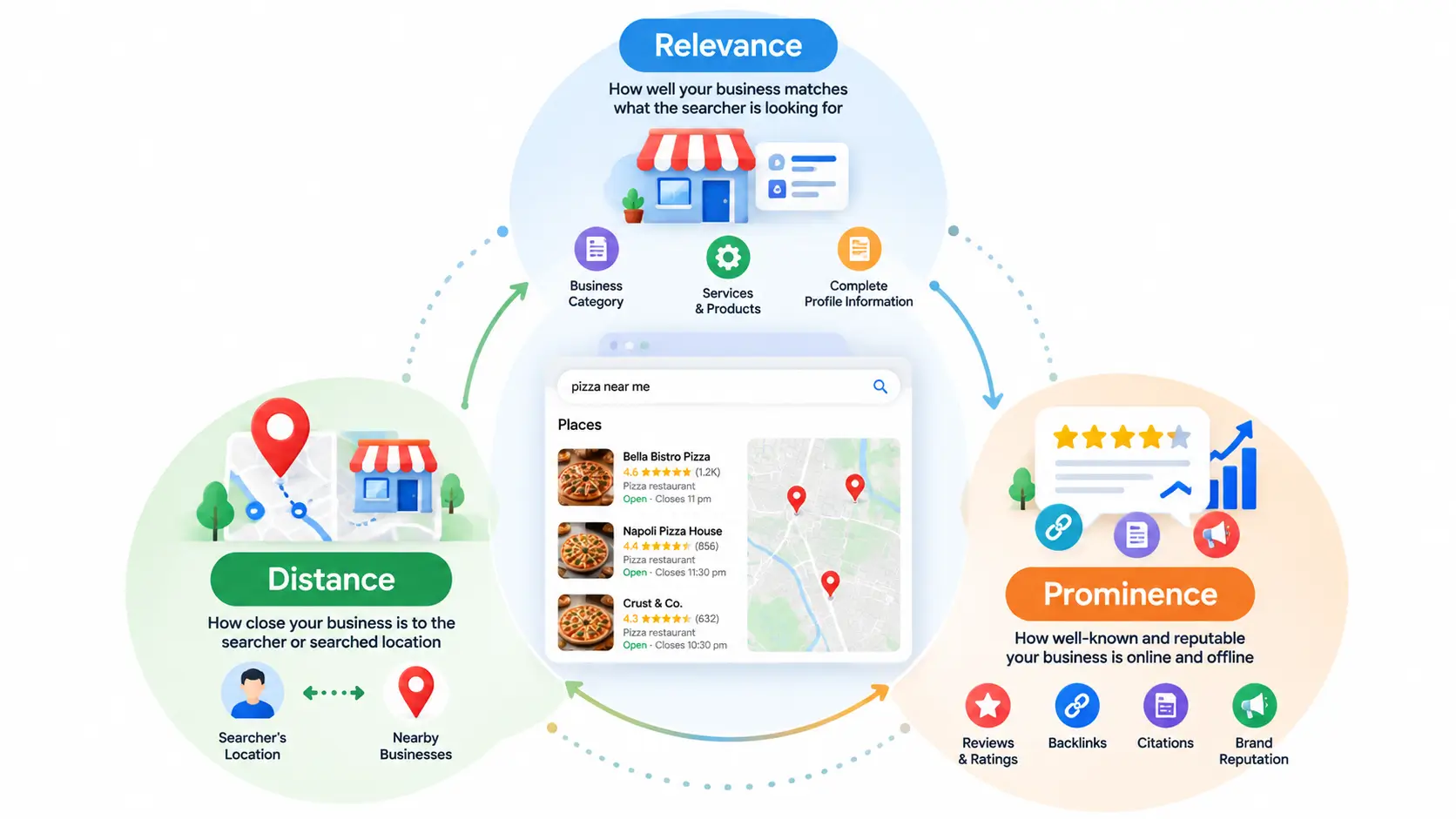
Google evaluates local pack placement using three core factors, and understanding each one is the foundation of any local SEO strategy.
Relevance
This measures how well a business profile matches what the searcher is looking for. A well-categorized profile, a complete business description, and content that clearly reflects your services all help Google understand where you fit.
Distance
This is exactly what it sounds like how close a business is to the location referenced in the search, or the searcher’s physical location if no location is specified. You can’t fully control this one, but it explains why local pack results vary so much even for the same search term in different neighborhoods.
Prominence
Prominence reflects how well-known and reputable a business is, both online and offline. This includes review quantity and rating, the strength of your backlink profile, citation consistency across directories, and even offline reputation factors like press mentions. Of the three factors, prominence is usually the one businesses have the most ongoing control over.
How Digital Marketing Helps Improve Local Pack Visibility
Appearing in the Google Local Pack requires more than simply creating a Google Business Profile. A strong digital marketing strategy can improve your business’s relevance, prominence, and overall local visibility.
1. Local SEO Builds Relevance
Optimize your Google Business Profile, website, services, and location pages to clearly communicate what your business offers and where you serve.
2. Google Business Profile Optimization
Keep your profile complete and accurate with the right categories, services, business information, photos, hours, and regular updates.
3. Reviews Build Prominence
Encourage genuine customer reviews and respond professionally to feedback. A consistent review strategy can strengthen your online reputation.
4. Local Content Supports Visibility
Create useful, location-focused content such as “Things to Do in Munnar” or “Taxi Services in Thrissur” to build local relevance and attract potential customers.
5. Citations & Backlinks Strengthen Authority
Maintain consistent business information across relevant directories and earn quality backlinks from reputable local and industry websites.
6. Social Media Builds Brand Awareness
Regular social media activity can increase brand visibility, customer engagement, and searches for your business, supporting your broader local marketing strategy.
7. Website SEO Complements Local Pack
A mobile-friendly, well-optimized website with clear services, location pages, internal links, and relevant content can support your overall local SEO efforts.
FAQ
What is the Google local pack?
The local pack is the block of three business listings Google shows with a map at the top of search results for location-based queries. Also called the 3-pack or map pack, it appears above standard organic results for searches with clear local intent, like “coffee shop near me.”
What’s the difference between the local pack and organic results?
The local pack pulls from Google Business Profile data reviews, hours, categories not webpage content alone. Organic results rank standard web pages based on content and backlinks. A business can appear in one, both, or neither, since they use overlapping but distinct ranking systems.
Can you pay to appear in the local pack?
No, standard local pack placements are unpaid and based on relevance, distance, and prominence. However, Google sometimes shows Local Services Ads above the local pack, which are a separate paid feature and shouldn’t be confused with organic 3-pack rankings.
How many businesses appear in the local pack?
Google typically shows three businesses in the local pack, which is why it’s commonly called the “3-pack.” Searchers can click “More places” to see an expanded list of additional nearby businesses in the full Local Finder view.
Why did my business disappear from the local pack?
Common causes include an incomplete or inconsistent Google Business Profile, a drop in review volume or rating, NAP inconsistencies across the web, or increased competition from nearby businesses with stronger local signals. Auditing your profile is the fastest way to diagnose it.
What factors influence local pack rankings?
Google evaluates three core factors: relevance (how well your profile matches the search), distance (proximity to the searcher or searched location), and prominence (review volume, ratings, backlinks, and overall business reputation online).
Key Takeaways
The Google local pack is one of the highest-value real estate spots in search for any business with a physical location or service area. It’s driven primarily by your Google Business Profile, but supported by broader SEO signals like backlinks and website relevance. Winning a spot comes down to three levers relevance, distance, and prominence and the businesses that consistently invest in a complete profile, review generation, and citation consistency tend to hold their position over time.


