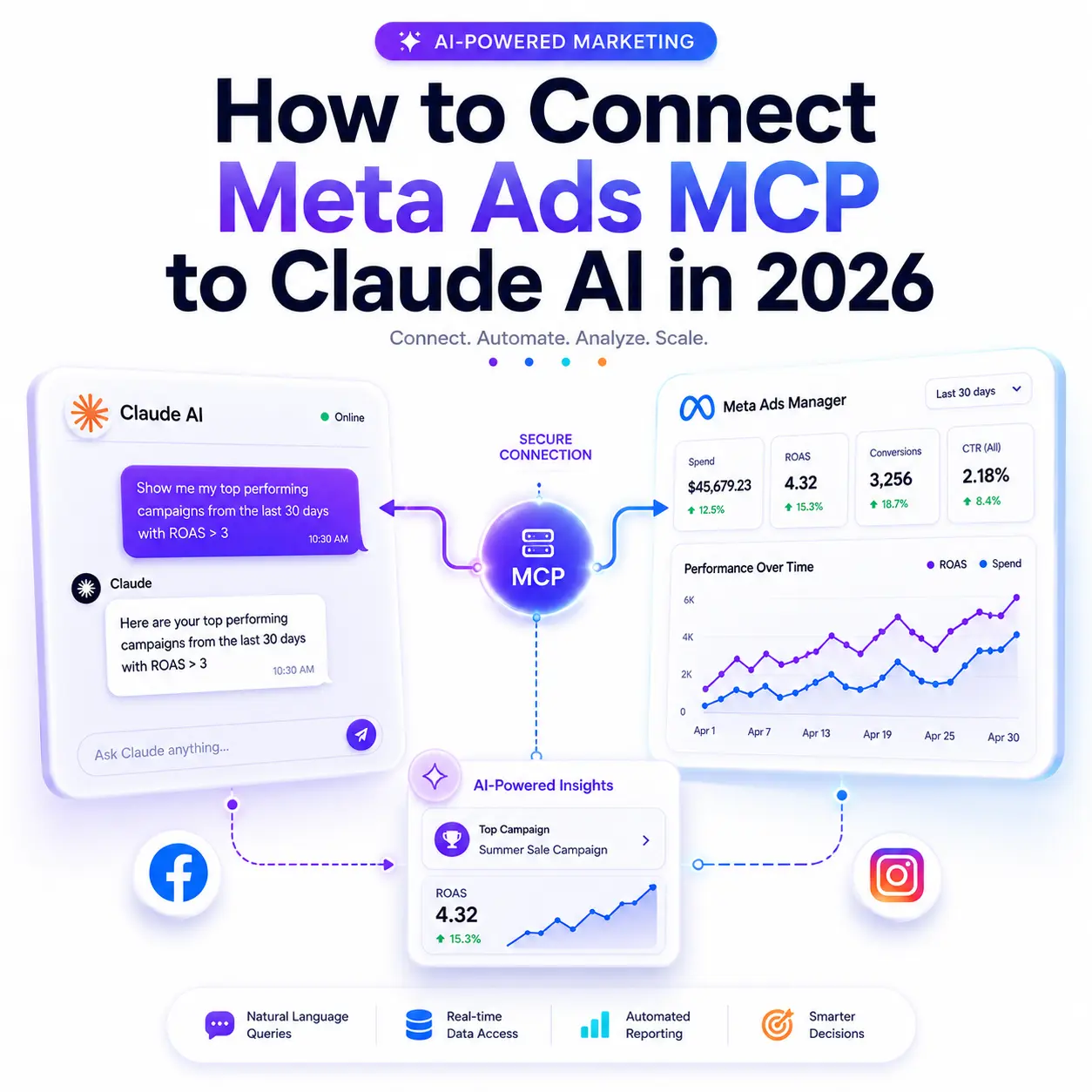
Meta quietly changed the rules of advertising on April 29, 2026.
With the launch of Meta Ads AI Connectors in open beta, Facebook and Instagram advertisers can now connect their ad accounts directly to Claude AI no API keys, no developer credentials, no complicated setup. Just natural language, live campaign data, and 29 powerful tools at your disposal.
If you run Meta ads and use Claude, this is the integration you’ve been waiting for. This guide walks you through exactly how to set it up, what you can do with it, and what risks to watch for so you can start working smarter today
What Is Meta Ads MCP and Why Does It Matter?
Before diving into setup, it helps to understand what you’re actually connecting.
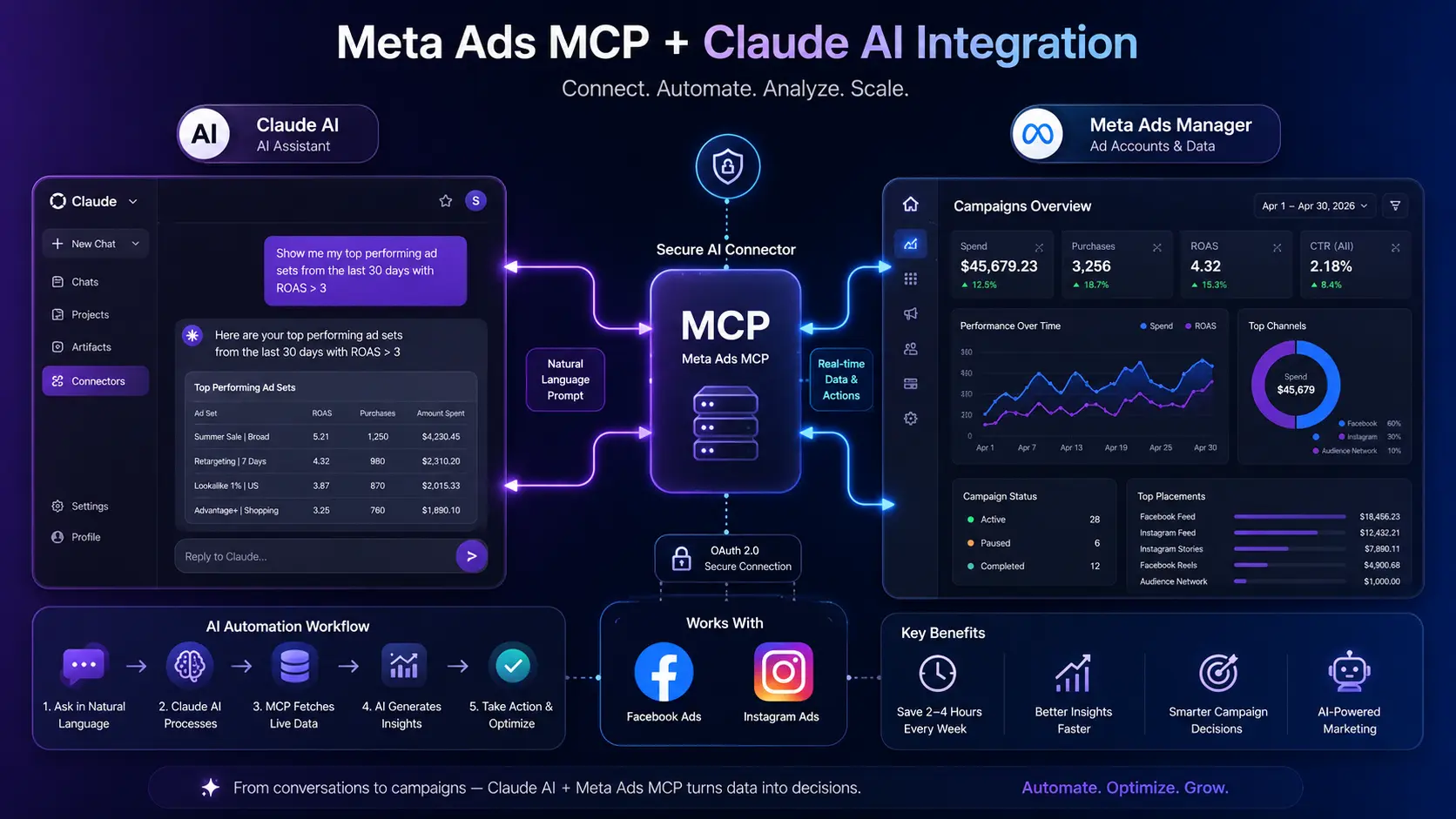
MCP stands for Model Context Protocol an open standard originally developed by Anthropic that defines how AI assistants discover, authenticate, and call external tools. Think of it as a universal adapter. Instead of building custom API integrations for every service, MCP gives AI tools like Claude a standardized way to connect to external data sources and take actions on your behalf.
Meta’s official MCP server lives at mcp.facebook.com/ads . When you connect it to Claude, your AI assistant gains access to 29 tools that cover the full Meta Marketing API campaigns, ad sets, audiences, creatives, catalogs, and diagnostics all accessible through plain English
conversation.
What makes this launch significant isn’t just the tooling. It’s the permission. Throughout 2025, advertisers using unofficial third-party connectors to link AI tools to Meta faced real account suspension risks. Meta has now officially blessed this path. Using AI Connectors does not violate Meta’s advertising policies and will not trigger account restrictions.
The practical impact? Tasks that used to consume 2–4 hours of weekly manual work exporting CSVs, cleaning data, building reports, presenting insights can now happen in under 6 seconds with a single Claude prompt.
Before You Start: What You Need
Setting up the connection takes less than 10 minutes, but you’ll need a few things in place first.
On the Claude side:
A Claude Pro or Max subscription (claude.ai). The free tier does not support custom MCP connectors. Claude Code users can access it via terminal command, which has its own pricing.
On the Met
a side:
- An active Meta Business Manager or Business Portfolio account
- Confirmed open-beta access Meta’s AI Connectors are rolling out gradually. You may be able to complete the setup steps below, but if you’re not in the beta yet, live data may not be available until your account is granted access.
- No Developer App registration, no app review, and no access token needed. The official path uses standard Meta Business OAuth the same login flow used by Shopify, Mailchimp, and other third-party apps.
Step-by-Step: How to Connect Meta Ads MCP to Claude AI
There are three ways to make this connection. Here’s each one, starting with the recommended path for most marketers.
Method 1 — Connect via Claude.ai (Recommended)
This is the fastest route and requires no technical knowledge.
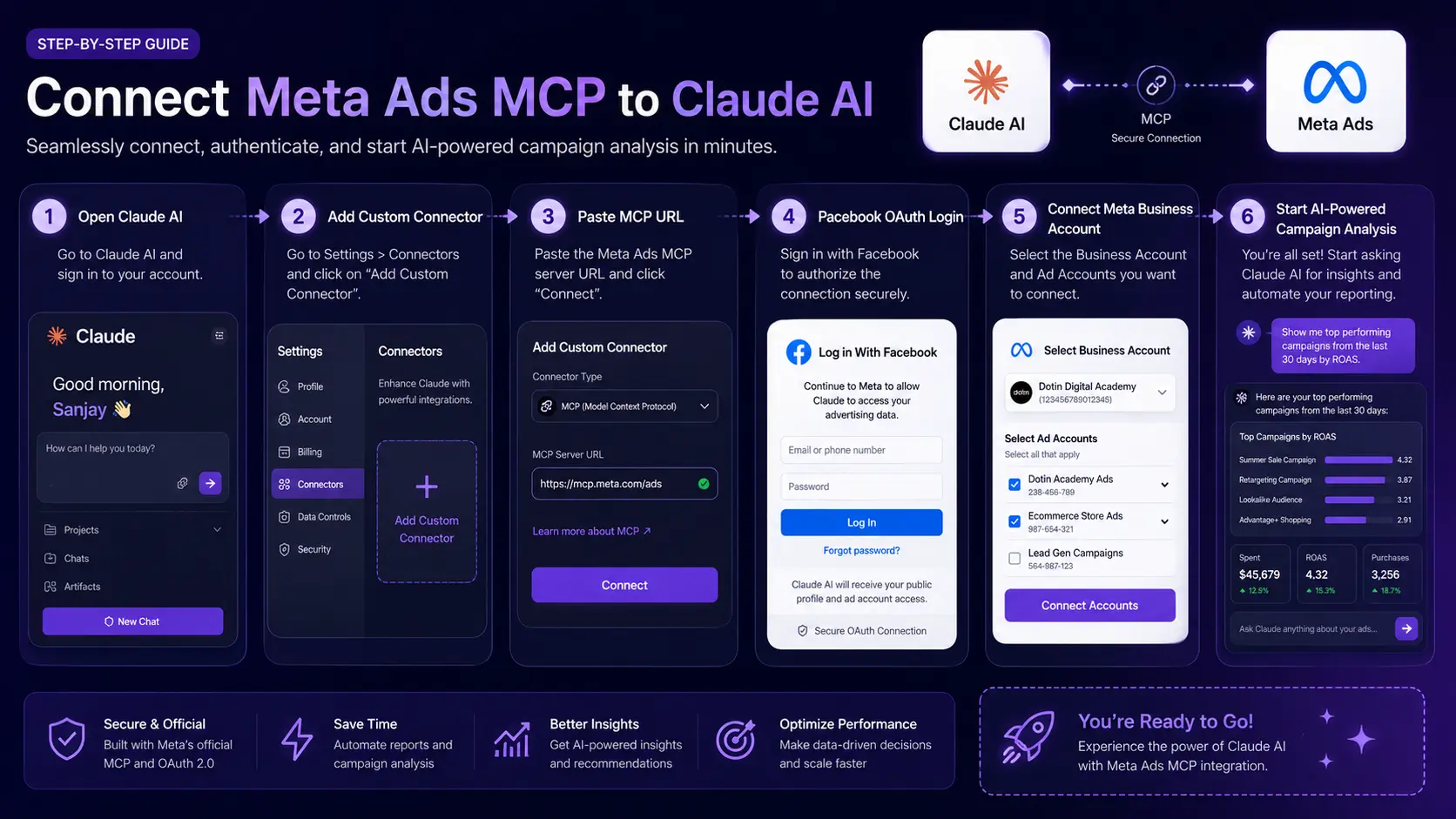
1. Log in to claude.ai with your Pro or Max account.
2. Click “Customize” in the left-hand menu.
3. Navigate to the Connectors section.
4. Click “Add custom connector”.
5. Give it a name (e.g., “Meta Ads”) and enter the official MCP server URL: https://mcp.facebook.com/ads
6. Click “Add” — the connector appears in your list, but you’re not connected yet.
7. Click the connector to trigger Facebook Login. You’ll go through a standard OAuth authorization screen to select which Business Portfolios to connect.
8. Once authorized, start a new chat, click “+”, select Connectors, and toggle your Meta Ads connector on.
That’s it. You can now ask Claude about your campaigns in plain English.
Method 2 — Connect via Claude Desktop (For Power Users)
If you use Claude Desktop rather than the web interface, you’ll need to edit your MCP configuration file manually. This takes around 15–30 minutes on a first install.
Locate your Claude Desktop config file (typically at ~/Library/Application Support/Claude/claude_desktop_config.json on macOS) and add the following:
json
{
}
“mcpServers”: {
“meta-ads”: {
“url”: “https://mcp.facebook.com/ads”
}
}
Save the file and restart Claude Desktop. The first time you use a Meta Ads tool, you’ll be prompted to authenticate via Facebook Login.
Method 3 — Connect via Claude Code (For Developers)
If you work in Claude Code — Anthropic’s command-line tool for agentic coding use this terminal command:
bash claude mcp add –transport http meta-ads “https://mcp.facebook.com/ads”
After running the command, exit and restart Claude Code. You can verify the connection is active by typing /mcp meta-ads server should appear in the list.
This path is most useful for teams building automated reporting workflows or ad operations scripts, where the Meta Ads CLI may also be worth evaluating as a complementary tool.
This path is most useful for teams building automated reporting workflows or ad operations scripts, where the Meta Ads CLI may also be worth evaluating as a complementary tool.
How to Verify Your Connection Is Working
In Claude.ai, open a new chat with the connector toggled on and type: “List my active campaigns.” If the connection is live, Claude will call the appropriate Meta tool and return your campaign data. If it returns nothing or an error, double-check that your account has open-beta access setup can complete successfully before data access is granted to your account.
What Can You Do with Meta Ads MCP and Claude AI?
Once connected, Claude becomes a conversational interface to your entire Meta advertising stack. Here’s what that looks like in practice.
Campaign Performance Analysis
The most immediately useful capability. Instead of logging into Ads Manager and manually filtering, sorting, and exporting just ask.
Claude calls tools like ads_get_ad_entities and returns structured insights with context not just raw numbers.
Automated Reporting
This is where the time savings are most dramatic. A comprehensive weekly report executive summary, campaign performance table, creative analysis, top wins, top concerns, and action items that would typically take an hour to build manually can now be generated with a single prompt in under 60 seconds.
Audience and Targeting Management
Create and update custom audiences, compare lookalike segments against interest-based ones, check CRM dataset quality, and identify matching issues with a conversational prompt like: “Show the matching quality of my CRM dataset over the last 30 days and flag any Purchase event losses.”
Creative and Catalog Operations
Notably, 10 of the 29 tools are focused on catalog operations a clear signal that Meta views e commerce advertisers as the primary use case. If you run product catalog ads or Dynamic Ads, you get disproportionate leverage here. You can fetch, update, and diagnose catalog assets, check feed errors, and identify visibility issues without touching Commerce Manager.
What the MCP Cannot Do
It’s worth being explicit about limitations. The MCP is not suited for sub-second programmatic bid management write operations run synchronously through conversational latency, measured in seconds, not milliseconds. Real-time automated bidding still belongs in a
deterministic Marketing API client. The MCP is best summarized this way: use it for analysis and strategy; use the CLI for scripted execution.
Meta Ads MCP Risks and Important Limitations
This integration is powerful, but going in with eyes open will save you headaches.
New assets are paused by default. Any campaigns, ad sets, or ads you create through the MCP connector are placed in a paused state automatically. You must activate them manually from Ads Manager before they go live. This is a deliberate safeguard nothing runs or spends without your explicit approval.
Open-beta access is not universal. Meta is rolling out AI Connectors gradually. You can complete the entire setup process and have a working connector that simply returns no data yet. If that happens, it means your account hasn’t been granted beta access not that your setup is broken. Monitor Meta’s announcements for general availability.
Token costs on large accounts. All 29 tool descriptions load into your Claude context window with each relevant conversation. On accounts with heavy catalog usage, complex prompt chains can burn meaningful input tokens. If you’re on a usage-limited plan, be intentional about scoping your prompts.
The human-in-the-loop principle still applies. Meta’s own guidance is clear: review what your AI assistant proposes creative, targeting, budget adjustments before approving it. The connector inherits your existing account permissions and spending limits, but it does not replace your judgment.
Official Meta MCP vs. Third-Party Connectors: Which Should You Use?
The official Meta MCP isn’t the only path. Tools like Pipeboard, Adzviser, and Adkit have been building Meta Ads MCP integrations for 18+ months and offer capabilities the official server doesn’t.
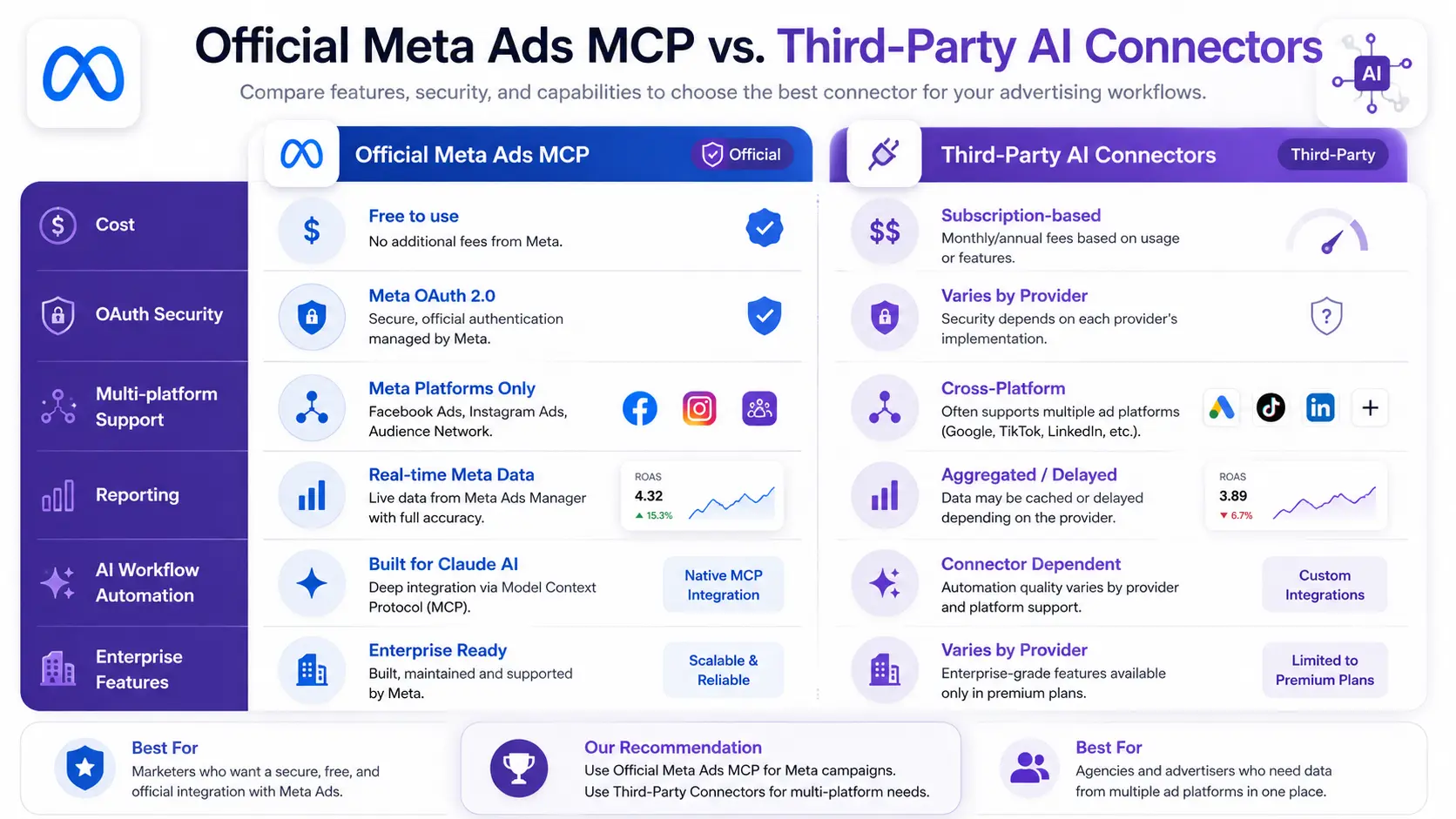
Stick with the official Meta MCP if:
- You’re a solo marketer or small team managing one or two Meta ad accounts
- You want zero subscription costs and zero API token management
- You need the Meta-blessed, policy-safe path with no third-party intermediary
- Your primary need is analysis and conversational reporting
Consider a third-party connector if:
- You manage Meta, Google Ads, and TikTok in one workflow and need cross-platform analytics in a single Claude conversation
- You need white-labeled client reporting for agency use
- You want proactive alerting, Google Sheets integration, or scheduled report delivery
- You’re managing 10+ ad accounts and need enterprise-grade access controls
The official MCP won this round on access (no subscription) and safety (Meta’s own OAuth). Third-party tools won on breadth and workflow depth. Neither is strictly superior the right choice depends on your scale and workflow.
Frequently Asked Questions
Does connecting Meta Ads MCP violate Meta’s advertising policies? No. The official Meta Ads MCP is built and maintained by Meta, uses their own authentication system, and is explicitly approved under their Terms of Service. It is not a third-party scraper or unauthorized automation tool. Meta’s launch documentation states clearly that using AI Connectors will not result in
account restrictions.
Can I manage multiple Meta ad accounts through Claude? Yes, through the official MCP you can connect multiple Business Portfolios during the OAuth authorization step. Third-party connectors like Pipeboard support up to 50 ad accounts on enterprise plans with more granular access controls.
Can I create and launch live ads through Claude? You can create campaigns, ad sets, and ads but they are placed in a paused state by default. Nothing goes live without you manually activating it from Ads Manager. This is intentional and protects you from accidental spend.
Does this work for Instagram ads too? Yes. Facebook and Instagram ads are both managed through the same Meta Marketing API and Ads Manager, so the MCP connection covers both platforms seamlessly.
Final Thoughts on Meta Ads MCP and Claude AI
Meta’s April 2026 launch didn’t happen in isolation. Google shipped its official Ads MCP in October 2025. Amazon Advertising followed in November 2025. Meta is the third major ads platform to release an official agent connector and the first to launch with full read-and-write
capability from day one.
The practical takeaway for marketers: the tools to manage campaigns conversationally through AI are here, they’re officially sanctioned, and they work. The 2–4 hours a week that used to go to manual reporting, CSV exports, and dashboard navigation can now go to strategy, creative thinking, and the work that actually compounds over time.
As AI automation becomes a core part of advertising platforms, professionals who understand tools like Meta Ads MCP, Claude AI, and AI-driven campaign optimization will have a strong advantage in the industry. Students and aspiring marketers looking to build future-ready skills can benefit from joining a professional digital marketing course in Kerala that covers AI marketing tools, Meta Ads automation, and modern performance marketing strategies.
Set up the connection today. Start with a simple prompt ask Claude to show you your top performing ad sets from the last 30 days. See what it returns. The best way to understand what this integration changes is to experience the shift yourself.


