If you’re spending money on Google Ads without a recent audit, you’re likely leaking budget somewhere a broken conversion tag, a bloated broad-match keyword list, or a Performance Max campaign chasing the wrong signals. A proper Google Ads audit isn’t a one-time cleanup; it’s a structured, repeatable process that catches these issues before they compound.
2026 makes this more urgent than in past years. Google’s automated systems Smart Bidding, Performance Max, and the newer AI Max for Search now make far more decisions than a human account manager ever did. That’s efficient when the underlying data is clean, and expensive when it isn’t. This guide walks through a seven-step Google Ads audit framework built for how Google Ads actually works today, not the manual, keyword-by-keyword process most checklists still assume.
What Is a Google Ads Audit
A Google Ads audit is a systematic review of your account structure, tracking, keywords, ad creative, bidding, and budget designed to find where performance is falling short and why. The goal isn’t just to spot problems; it’s to understand which fixes will actually move the needle.
What’s different this year is how much of the account is now run by machine learning rather than manual settings. Performance Max and AI Max campaigns hand more control to Google’s algorithms, which means a traditional Google Ads audit checking individual keyword bids, match types, and ad group structure misses where the real decisions are being made. An effective 2026 audit still covers the fundamentals, but it also has to evaluate the signals and guardrails you’re feeding the automation, because that’s what’s actually steering spend now.
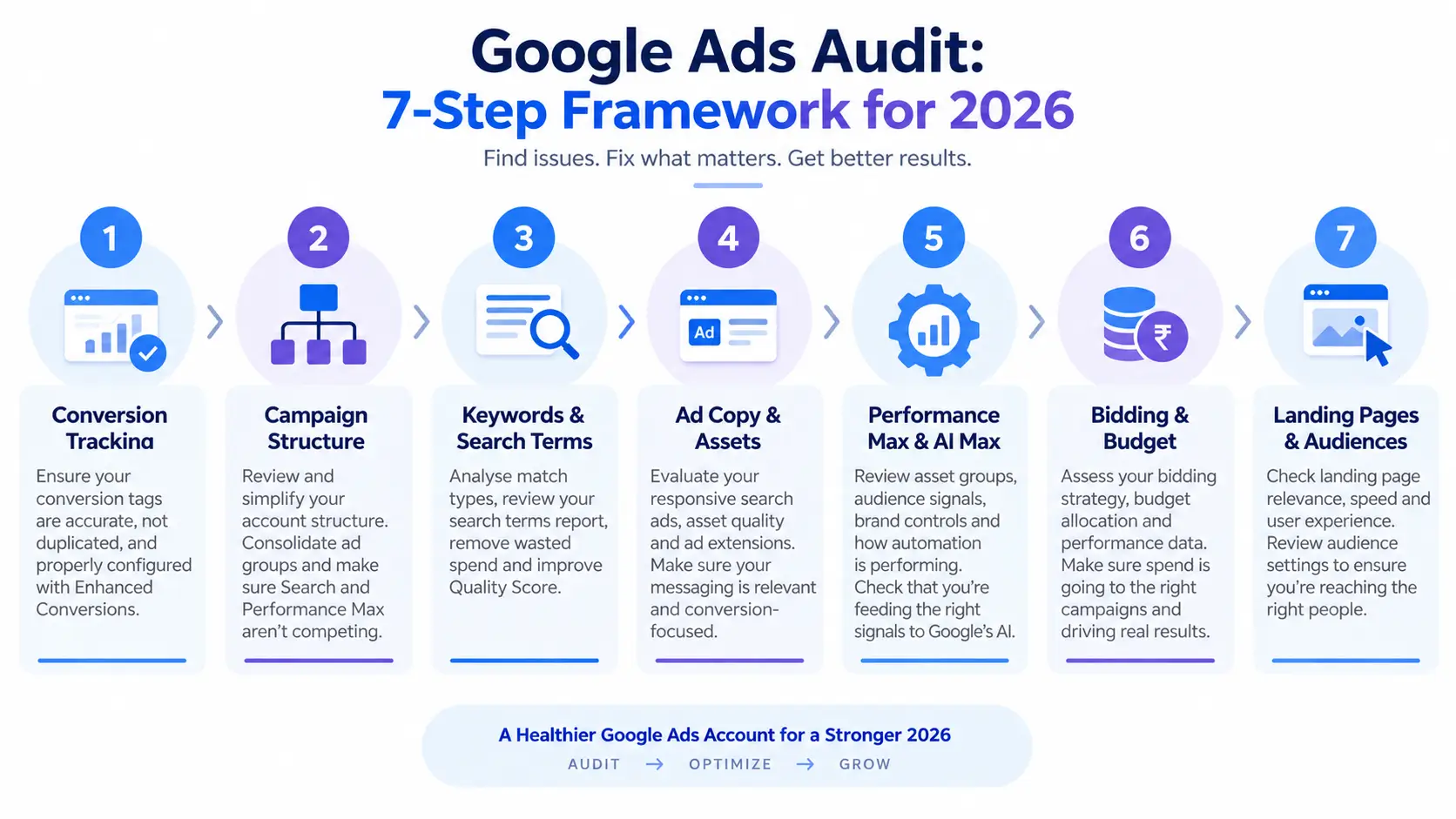
Step 1: Audit Your Conversion Tracking First
Start here, not with keywords or bidding. Every automated system in Google Ads Smart Bidding, PMax, AI Max makes decisions based on your conversion data. If that data is wrong, everything downstream inherits the error. This is the “garbage in, garbage out” problem: an algorithm optimizing toward broken or inflated conversions will confidently spend your budget in the wrong direction.
Verify conversion actions are firing correctly
Check the status of each conversion action under Tools & Settings. “No recent conversions” often signals a broken tag rather than a genuine lack of conversions confirm with Google Tag Assistant or a live test transaction.
Check for duplicate or inflated conversions
A common and costly error: a conversion tag firing multiple times per transaction, or a misconfigured event (a page view logged as a purchase). Compare Google Ads conversion counts against your CRM or backend numbers a large gap is a red flag.
Confirm Enhanced Conversions and consent mode are configured
Enhanced Conversions improve match accuracy, especially on mobile, and consent mode ensures you’re not silently losing tracked conversions due to cookie consent gaps. Both should be enabled at the account level if you haven’t touched this in the last year.
Step 2: Review Account and Campaign Structure
Account structure has shifted meaningfully in recent years. The old approach dozens of tightly segmented ad groups, each with a handful of exact-match keywords actively works against Smart Bidding, which needs enough data volume per ad group to optimize well. Modern structures favor consolidation.
Campaign hierarchy and consolidation
Review whether your ad groups are still split into overly narrow silos left over from a manual-bidding era. Consolidating related keywords into fewer, thematically tight ad groups usually gives the algorithm better data to work with.
Are Search and Performance Max cannibalizing each other?
Check your Auction Insights and search term overlap between Search and PMax campaigns. It’s common for PMax to start bidding on the same branded or high-intent terms your Search campaigns already own, quietly inflating your cost per conversion without adding incremental reach.
Step 3: Google Ads Audit Keywords, Search Terms, and Quality Score
Match type distribution and broad match risk
Review how your keywords are matched against actual search terms. Broad match paired with Smart Bidding can work well, but only if bidding is tightly tied to conversion value otherwise it tends to bleed spend into loosely related queries.
Search Terms Report: finding and cutting wasted spend
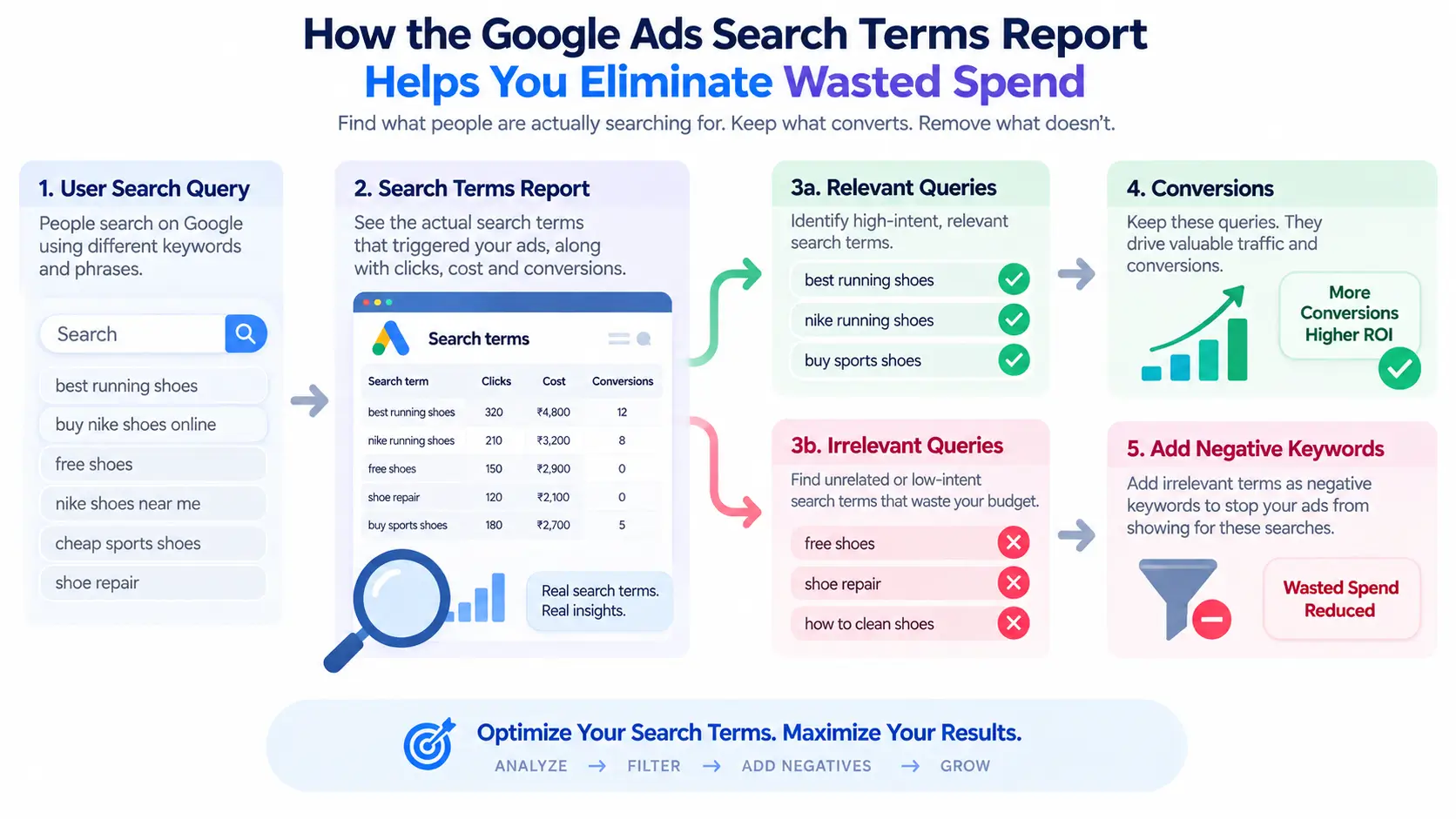
This report is still one of the highest-value places to look. Pull the last 30–90 days and flag search terms with meaningful spend but no conversions. Add these as negatives, and look for patterns (a recurring irrelevant phrase, a competitor brand term) rather than pruning one term at a time.
Quality Score breakdown
Google Ads Quality Score is built from three components: expected click-through rate, ad relevance, and landing page experience. A lower score raises your cost per click and can limit visibility, so segment your Quality Score data by campaign and ad group to isolate the worst offenders rather than treating it as a single account-wide number.
Step 4: Evaluate Ad Copy and Assets
Responsive Search Ads and Ad Strength
Aim for 8–12 distinct headlines and up to four descriptions per ad, avoiding repetitive messaging and unnecessary pinning, which limits how many combinations Google can test. Check Ad Strength ratings and address any ads still sitting at “Poor” or “Average.”
Asset coverage
Confirm sitelinks, callouts, structured snippets, and image assets are active, current, and relevant to each campaign. Missing or outdated assets shrink your ad’s real estate on the results page and can quietly drag down performance.
Step 5: Audit Performance Max and AI Max Campaigns
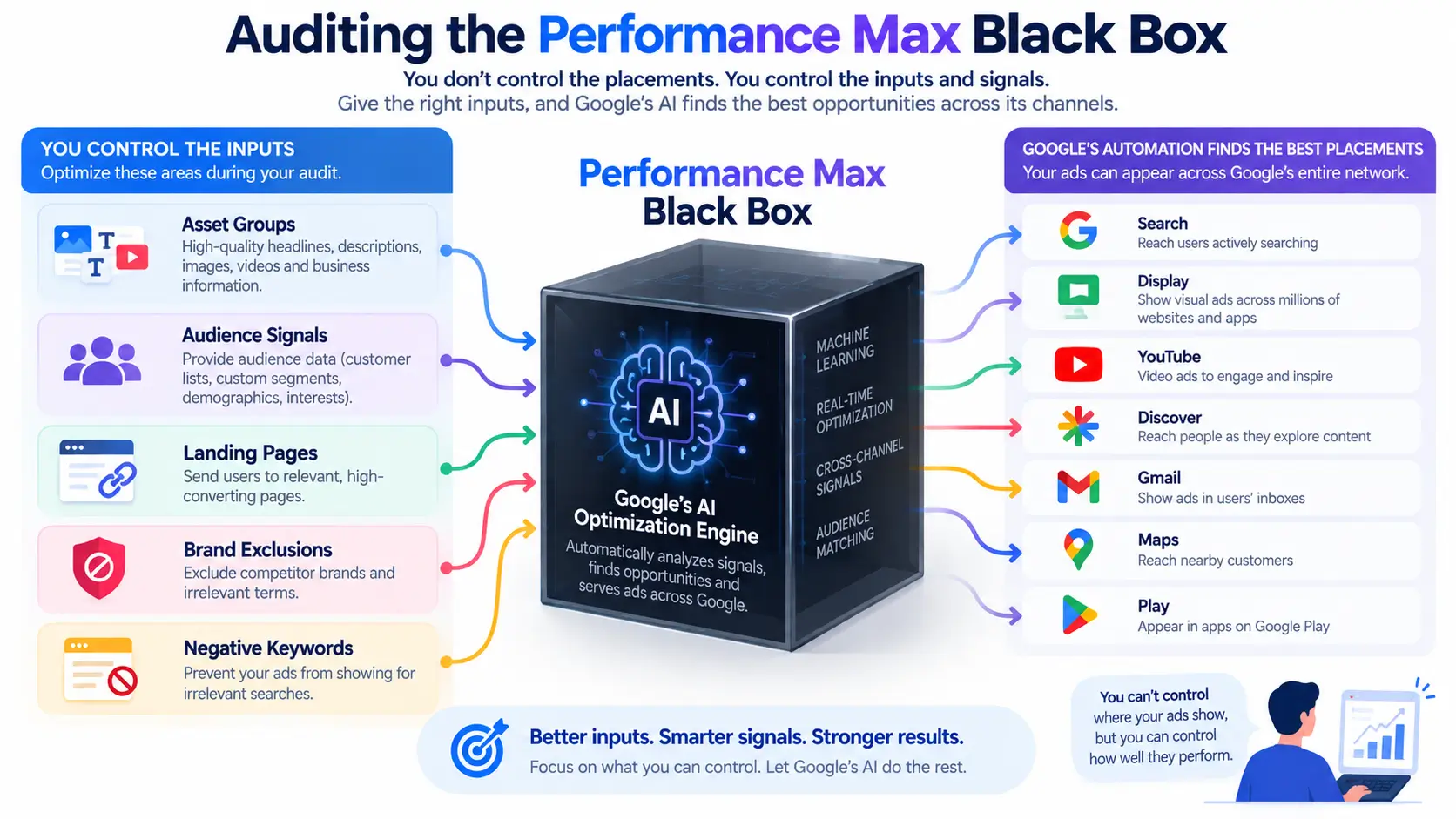
This is where most Google Ads audit checklists fall short and where a 2026 audit needs to spend real time. Performance Max is often described as a “black box” because it offers limited visibility into individual placements and search terms, so auditing it means shifting focus from bid-level tactics to the inputs that feed the algorithm.
Auditing the PMax “black box”
Since you can’t control PMax the way you control Search, focus on what you can control: asset group themes, audience signal quality, and whether each group is cleanly aligned to a single product, audience, and landing page rather than a catch-all mix.
What to check in AI Max
AI Max for Search effectively pushes campaigns toward broader match expansion, which only works safely when paired with Smart Bidding. If a campaign has AI Max enabled without a tCPA, tROAS, or Maximize Conversions strategy behind it, that’s a setup likely to overspend. Also review the AI Brief the structured business context (value proposition, audience description, off-brand language exclusions) that shapes what AI Max generates since a thin or outdated brief produces generic, lower-performing variations.
Setting negative keywords and exclusions
Both PMax and AI Max support account-level negative keywords and brand exclusions. Confirm these are actually configured it’s a step that’s easy to skip during setup and just as easy to forget during an audit.
Step 6: Review Bidding Strategy and Budget Allocation
Is your Smart Bidding strategy matched to your conversion volume?
Smart Bidding strategies need a minimum volume of conversions to learn effectively typically at least 30 conversions per month per campaign. A tROAS or tCPA strategy on a low-volume campaign often underperforms simply because the algorithm doesn’t have enough data to optimize.
Budget pacing and reallocating spend to winners
Look at where budget is being capped versus where it’s underspending. Shift budget toward campaigns and ad groups with a proven, strong conversion rate, and pause or restructure the ones consistently driving low-quality traffic.
Step 7: Check Landing Pages and Audience Targeting
Landing page relevance and load speed
An ad can be well-targeted and still underperform if the landing page doesn’t match what the ad promised, loads slowly, or is hard to navigate on mobile. This is frequently the actual bottleneck behind a “bad keyword,” so don’t stop the audit at the ad level.
Remarketing and Customer Match list health
Check that remarketing lists are populated and current, and that Customer Match audiences are refreshed regularly stale lists quietly shrink in reach and lose relevance over time.
Google Ads Audit Checklist: Quick Summary
- Conversion tracking is firing correctly, without duplicates
- Account structure is consolidated, not fragmented into overly narrow ad groups
- Search Terms Report reviewed for wasted spend in the last 30–90 days
- Quality Score segmented and low scorers identified
- RSAs have strong Ad Strength and full asset coverage
- PMax asset groups and audience signals reviewed
- AI Max paired with Smart Bidding, with a current AI Brief and exclusions set
- Bidding strategy matches actual conversion volume
- Budget reallocated toward top-performing campaigns
- Landing pages match ad intent and load quickly
- Remarketing and Customer Match lists are current
How Often Should You Audit Your Google Ads Account?
Run a full audit quarterly, with a lighter monthly check in between. Accounts leaning heavily on Performance Max or AI Max benefit from more frequent review roughly every two to three weeks since automated bidding can drift faster than manual campaigns when audience signals or conversion patterns shift.
FAQ
What is included in a Google Ads audit?
A complete Google Ads audit covers conversion tracking accuracy, account and campaign structure, keyword and search term analysis, ad copy and asset strength, bidding strategy alignment, budget allocation, landing page relevance, and audience and remarketing health.
Can you audit a Performance Max campaign the same way as a Search campaign?
No. PMax offers far less visibility into search terms and placements. Audits should instead focus on asset group themes, audience signal quality, brand exclusions, and search term insights rather than keyword-level bids.
How much wasted spend is normal in a Google Ads account?
There’s no universal benchmark, but unaudited accounts commonly waste 15–25% of spend on irrelevant search terms, poor match types, or misaligned automated bidding goals. Regular audits are the primary way to catch and reduce this.
What tools can I use to audit Google Ads for free?
Google’s built-in Recommendations tab and Auction Insights offer a starting diagnostic, though manually reviewing the Search Terms Report remains the most reliable free method for spotting wasted spend.
What’s the difference between a Google Ads audit and optimization?
A Google Ads audit diagnoses problems a structured evaluation that surfaces issues and opportunities. Optimization is the action taken afterward, like adjusting bids or rewriting ads. An audit should always come first.


