Bounce rate has quietly become one of the most misunderstood metrics in digital marketing. Half the people staring at a “high” number panic over nothing the other half ignore a number that’s genuinely costing them conversions. In 2026, with Google Analytics 4 (GA4) now running the show, the metric works differently than most guides admit and that changes how you fix it.
This guide breaks down what bounce rate actually means today, what a healthy number looks like for your industry, and 15 specific, implementable fixes to keep visitors engaged. No fluff, no recycled 2019 advice.
What Is Bounce Rate
A bounce is a visit where someone lands on your page and leaves without meaningful interaction. Simple enough but the way that’s
measured was rewired when GA4 replaced Universal Analytics.
How GA4 calculates bounce rate differently
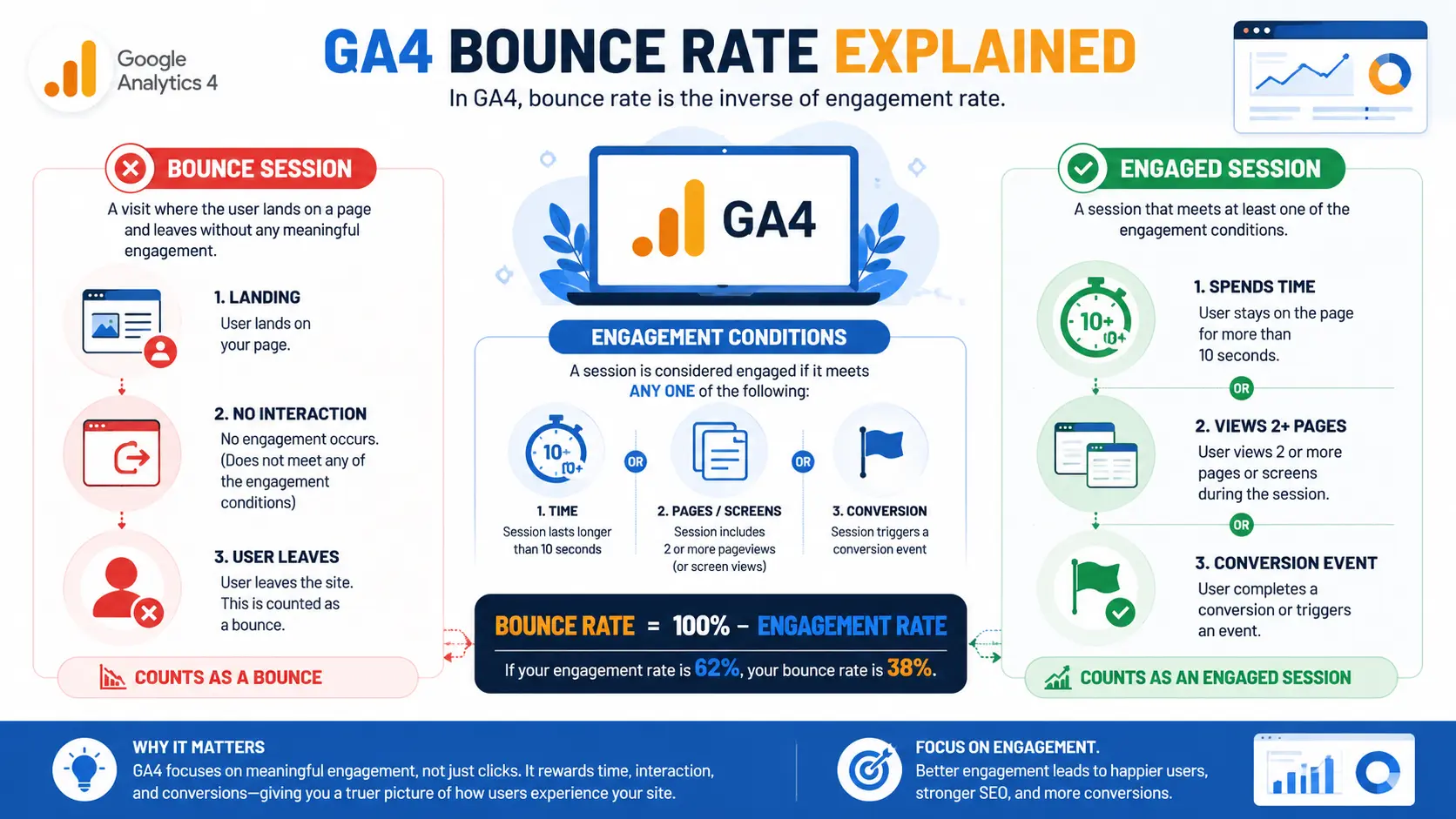
In GA4, bounce rate is simply the inverse of engagement rate. A session counts as engaged if it meets any one of three conditions it lasts longer than 10 seconds, includes two or more pageviews, or triggers a conversion event. If your engagement rate is 62%, your bounce rate
is 38%. That’s it.
This matters enormously. Under the old Universal Analytics model, a reader who spent 15 focused minutes absorbing your best blog post still counted as a bounce because they didn’t click a second page. GA4 fixes that flawed logic by rewarding time and interaction,
not just clicks.
Why your bounce rate may look different after switching to GA4
Because the two systems measure fundamentally different things, the numbers aren’t comparable. A blog post that showed a 75–90% bounce rate in Universal Analytics might show 35–55% in GA4 same traffic, same content. If your rate “changed” after migrating,
don’t read it as a real shift in user behavior. You’re simply looking at a smarter metric.
One quirk worth knowing GA4 hides bounce rate from the default dashboard. You have to add it manually, which is why so many teams have never configured it properly.
What Is a Good Bounce Rate in 2026? (Industry Benchmarks)
Before you fix anything, find out whether you actually have a problem. The cross-industry median bounce rate in 2026 sits around 47%, with engagement rate at roughly 53%. But the median is the wrong target if you want to compete the top quartile of sites achieves about
36%, and that’s the benchmark serious operators measure against.
Average bounce rates by industry
Context is everything. The same number means opposite things depending on what your page is built to do:
- Blogs and content sites: 65–90% is common and often fine. A reader who answers their question and leaves got exactly what they came for.
- Ecommerce product pages: 45–55% is typical. Higher than that usually signals friction.
- SaaS dashboards and apps: Below 30% on highly engaged products.
- B2B and professional services: 50–75%, often reflecting qualified single-page research sessions rather than failure.
The mobile vs desktop gap
Mobile sessions structurally bounce higher roughly 12 points above desktop. That gap has barely closed in three years despite heavy mobile-first investment, so don’t expect mobile to ever match desktop. Set realistic, device-specific targets instead of one blanket
goal.
When a high bounce rate is actually fine
A page answering a quick factual question can have a 90% bounce rate and be a roaring success. A pricing page with the same number is almost certainly broken. The skill is knowing the difference which only comes from segmenting your data, not staring at a single headline figure.
Why Visitors Are Bouncing
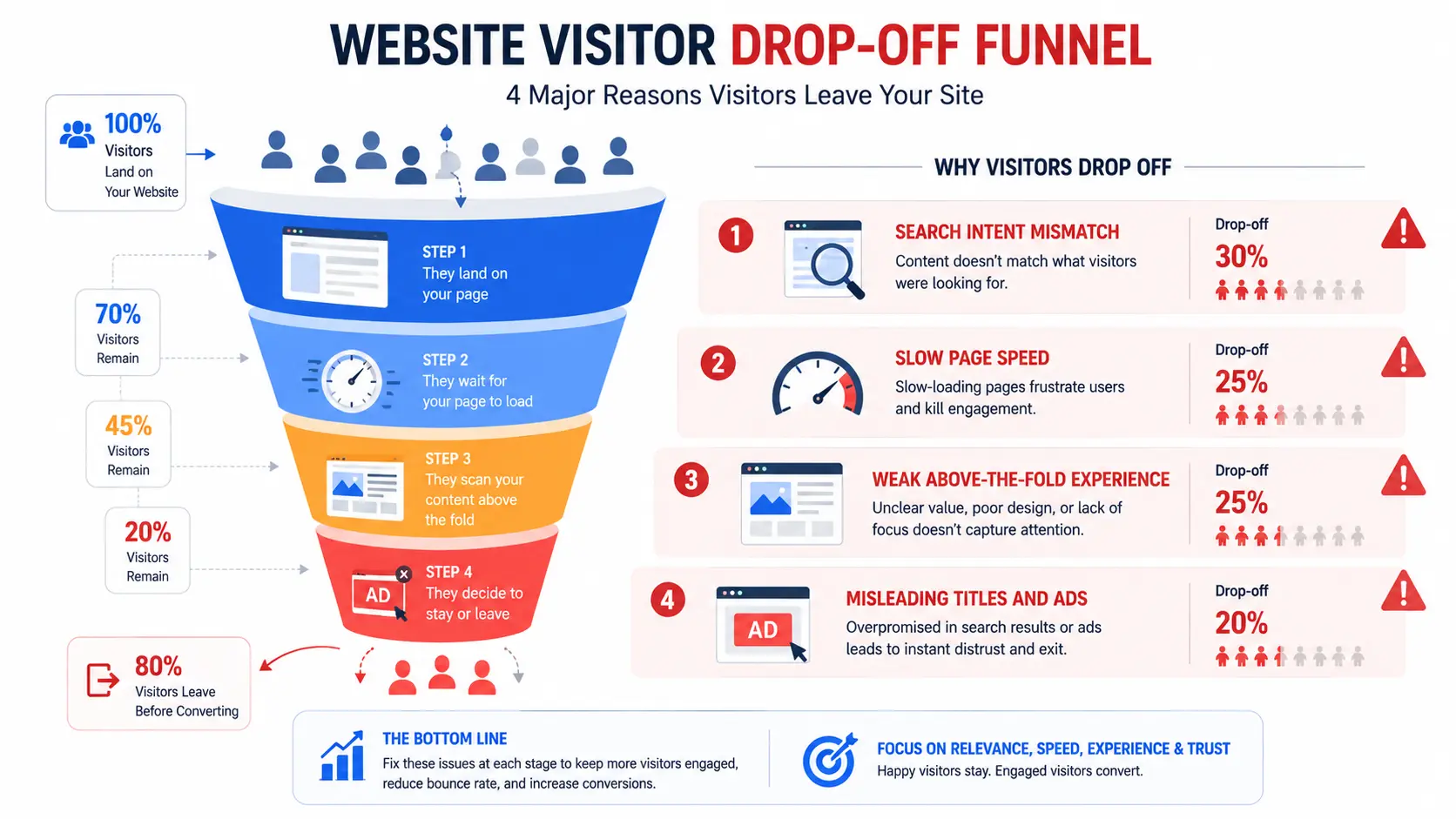
Treating every bounce as a UX failure leads to wasted effort. These are the real root causes, in rough order of impact.
Search intent mismatch – If someone searches for a digital marketing course in Thrissur expects detailed information about curriculum, fees, certifications, and career outcomes. If they land on a generic training page that doesn’t address those needs, they’ll likely leave immediately. No design tweak fixes a content-to-intent mismatch. This is the single most common cause and the easiest to overlook.
Slow load speed, especially on mobile – In 2026, around 53% of mobile users abandon a site that takes longer than three seconds to load. A one-second delay measurably reduces satisfaction and trust.
Weak above-the-fold experience – If the first screen doesn’t communicate value instantly, visitors don’t scroll. They judge in milliseconds.
Misleading titles, ads, or meta descriptions – Overselling in the SERP or in an ad inflates clicks and then inflates bounces just as fast. The gap between promise and page is where users leave.
How to Reduce Bounce Rate: 15 Actionable Fixes
Here’s the core playbook. Each fix maps to a measurable outcome.
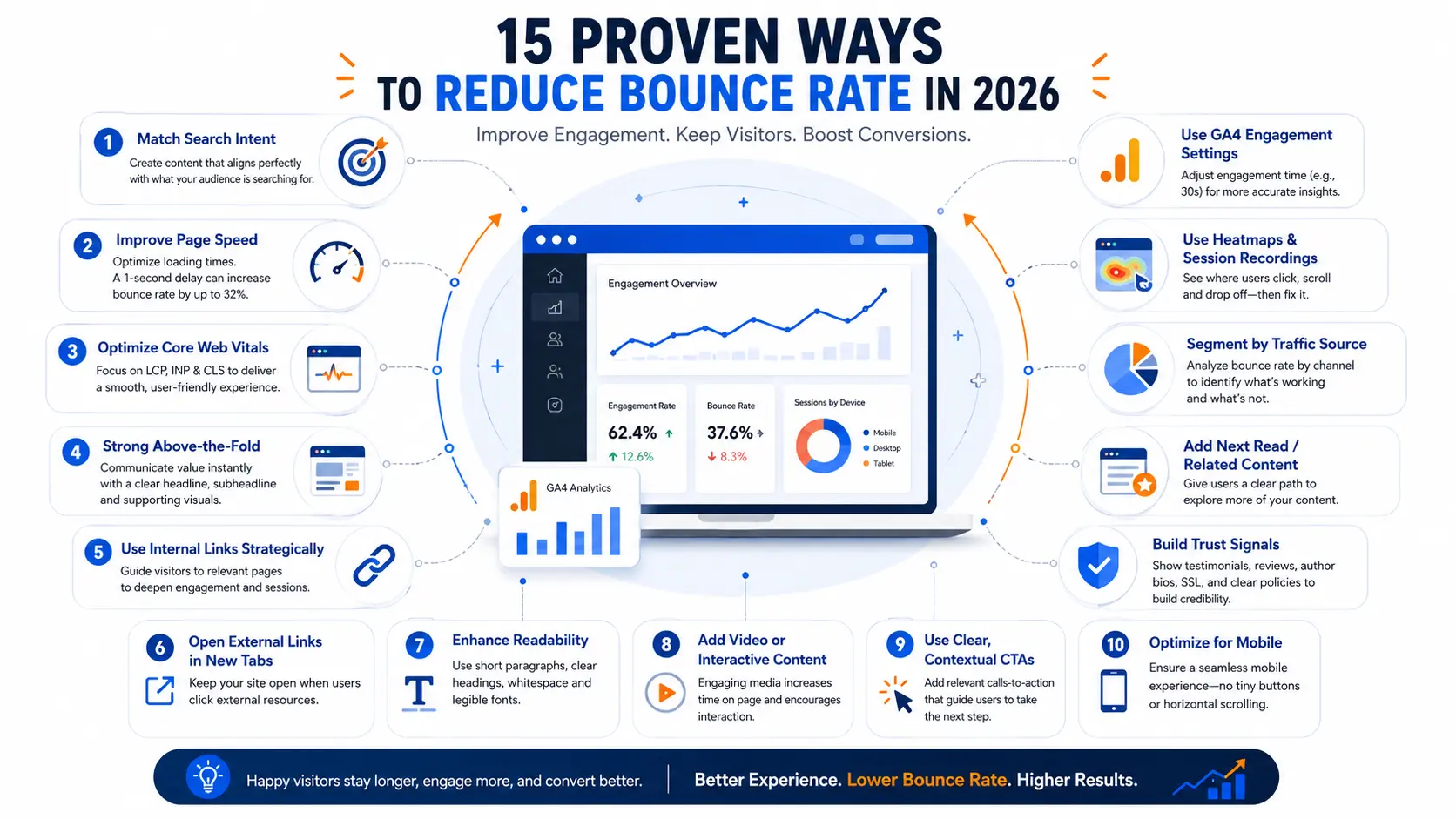
- Align every page to its exact search intent – Read the top-ranking results for your target query and match the format they reward guide, comparison, tool, or definition. This is the highest-leverage change you can make.
- Hit your Core Web Vitals targets – Optimize LCP (loading), INP (interactivity), and CLS (visual stability), prioritizing mobile. Compress images, defer non-critical scripts, leverage caching, and use a CDN.
- Redesign your above-the-fold section – Lead with a clear value proposition, a relevant headline, and immediate proof you can answer the visitor’s question.
- Use internal links strategically – Don’t sprinkle links decoratively link contextually to the genuinely next logical resource. This deepens sessions and distributes authority across your site.
- Open external links in new tabs – Adding target = “_blank” keeps your page open in the visitor’s browser, preventing accidental session loss when they click out.
- Improve readability – Short paragraphs, generous white space, descriptive subheadings, and a font size that’s legible on a phone. Walls of text bounce.
- Add video or interactive content – An embedded explainer video or interactive element measurably increases time on page and pushes sessions past the engagement threshold.
- Use clear, contextual CTAs – Generic banner ads get ignored. A relevant in-content prompt “Compare the three options” — invites the click that prevents the bounce.
- Fix mobile UX – Eliminate tiny tap targets, horizontal scrolling, and unclickable buttons. Around 60% of searches now happen on phones, so mobile friction is most of your bounce problem.
- Add trust signals – SSL (HTTPS), visible author bios, reviews, and an accessible privacy policy reassure visitors that your site is safe and credible.
- Reduce intrusive popups – Aggressive interstitials that block content on arrival are a direct invitation to hit back. Delay them, or trigger on exit intent instead.
- Add a “next read” or related posts section – Give visitors an obvious second destination before they reach the end of the page.
- Segment bounce rate by traffic source in GA4 – Organic, paid, social, and email behave very differently. A high bounce from one cold paid campaign is a campaign problem, not a site problem.
- Use heatmaps and session recordings – Tools like these show exactly where visitors stall, rage-click, or drop off turning guesswork into targeted fixes.
- Customize GA4’s engagement timer – The default 10-second threshold is too low for content-heavy pages. Raising it to 30 seconds gives you a far more honest read on whether people are genuinely reading.
How to Track Bounce Rate in GA4 (Step-by-Step)
Since GA4 hides the metric, here’s how to surface it.
Adding bounce rate to your reports
Go to Reports → Engagement → Pages and screens, then use the Customize columns option (the pencil/edit icon, upper right) to add bounce rate alongside engagement rate. You can build a saved custom report so you never have to repeat this.
Bounce rate vs engagement rate — which to track?
Track engagement rate as your primary metric and treat bounce rate as its shadow. Engagement rate is the number GA4 is built around, it’s harder to misread, and it keeps the conversation focused on what users did rather than what they didn’t.
Setting a smarter engagement timer
In Admin → Data Streams → your stream → Configure tag settings → Adjust session timeout, you can change the engagement threshold. Lifting it from 10 to 30 seconds filters out drive-by sessions and gives content sites a much truer engagement picture.
Frequently Asked Questions
Does bounce rate affect Google rankings? Bounce rate is not a confirmed direct ranking factor. However, it correlates with user-experience signals like dwell time and engagement, which Google does use to assess relevance. Reducing it usually improves SEO performance as a byproduct rather than a cause.
Why did my bounce rate change after switching to GA4? GA4 measures bounce rate completely differently from Universal Analytics. A reader who spent 15 minutes on one post was a bounce in UA but an engaged session in GA4. The two numbers measure
different things, so don’t compare them directly.
How does page speed affect bounce rate? Page speed has a direct, measurable impact. Around 53% of mobile users abandon a site that takes longer than three seconds to load, and even a one-second delay raises abandonment. Improving Core Web Vitals especially LCP is one of the fastest ways to lower bounce rate.
Final Thoughts: Chase the Experience, Not the Number
The biggest mistake in 2026 is treating bounce rate as the goal itself. It isn’t. It’s a signal a proxy for whether your page loads fast, matches intent, and earns a visitor’s attention.
Fix the experience and the number follows. Chase the number alone and you’ll optimize for vanity while missing the point. Start with intent and speed, configure GA4 honestly, and measure against your own industry’s reality. That’s how you reduce bounce rate in a way
that actually moves conversions.


